Multi Run MOD APK 1.0.52.20 (Premium)
⬇ Download APK (12 MB)| Version | 1.0.52.20 |
|---|---|
| Size | 12 MB |
| Updated | Oct 1, 2026 |
| Category | Tools |
| Requires | Android 7.0 |
| MOD info | Premium |
| Google Play | com.dong.multirun |
MOD features
- Premium.
Multi Run is a software for Android devices that allows running multiple different versions of the same app simultaneously on a single device. This tool serves users who need to separate personal, work, or gaming accounts without having to constantly log out and log in. According to data from Google Play, this app is developed by Jump Dong and supports creating isolated spaces for various applications.
What makes Multi Run special?
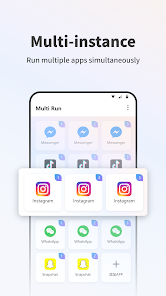
The highlight of Multi Run is its ability to clone apps to use independent accounts on the same device. Instead of switching accounts within the original app, users can open the version created by Multi Run and log in with a different account. This workflow is very useful when a single phone is used for both work and personal needs.
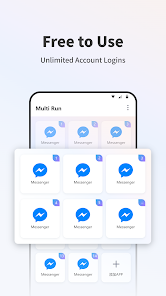
The app supports cloning various types of applications such as WhatsApp, Instagram, TikTok as well as games. Each created version has its own data space, preventing data confusion between accounts. Google Play also highlights features for users who want to manage multiple personal, work, and gaming profiles on a single device.
App cloning and multi-account management
With Multi Run, you can start by selecting the app you want to clone from the supported list. Once the setup process is complete, the cloned version will appear in the Multi Run interface and can be opened independently from the original app. This makes using two or more accounts much more convenient, especially for services that do not support logging into multiple accounts at the same time.
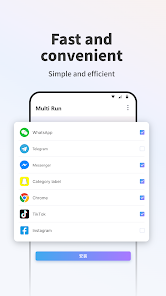
For games, the app also targets cases where players want to use two accounts on the same device. However, stable performance still depends on each specific game, Android version, and phone resources. Therefore, Multi Run should not be misunderstood as a tool that can automatically increase FPS or performance for all games; its core function remains creating a separate running environment for app versions.
A private space for work and personal use
Multi Run not only supports gaming but also helps users separate personal and work apps. For example, you can maintain one social media account for work and another for personal use on the same device.
The app also offers features to create a separate space for using apps, supports scheduled automatic switching, and includes Stealth Mode to hide important apps. These features are ideal for users who want to control how apps appear and operate in specific situations.
Tips and Guide for Multi Run
When starting to use Multi Run, you should only clone apps that are truly necessary. Creating too many copies can increase RAM and storage consumption, especially on low-end devices. After cloning, log into the correct account and check notification delivery before long-term use.
If you use apps for work, it is best to separate personal and work accounts into distinct versions for easier differentiation. In the case of games, test each game after cloning, as some games or services may detect the virtualization environment and behave differently from the original version.
Conclusion
Multi Run addresses practical needs on Android: running multiple app instances and managing multiple accounts on a single device. The ability to create dedicated spaces for personal apps, work, and games helps users save time by avoiding constant log-ins and log-outs. If you frequently use multiple accounts or want to separate usage environments on your phone, Multi Run is a tool worth trying.