| Version | 5.5.8 |
|---|---|
| Size | 19 MB |
| Updated | Oct 1, 2026 |
| Category | Tools |
| Requires | Android 5.0 |
| MOD info | Premium |
| Google Play | dev.epro.e_v2ray |
MOD features
- Premium.
e-V2ray is an Android V2Ray client application built to establish network connections through V2Ray configurations. The app aims to provide a more private and secure web browsing experience while supporting multiple protocols within the V2Ray ecosystem, as stated by the developer.
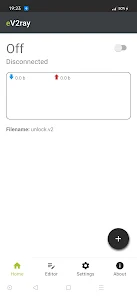
e-V2ray allows V2Ray connections on Android devices
Unlike typical VPN apps that come with built-in server lists, e-V2ray functions as a client to utilize V2Ray configurations. Users need to have server information or compatible configuration details before connecting. This makes the app suitable for those already familiar with using proxy solutions and V2Ray on Android.
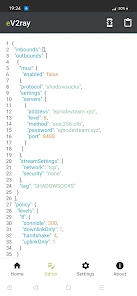
V2Ray can be applied in various scenarios, such as creating an intermediate connection layer between your device and the Internet or accessing the network through a user-selected server. However, real-world performance and stability depend on multiple factors like server quality, configuration settings, geographic location, and internet connectivity rather than just the app itself.
Managing V2Ray Connections via Client
With e-V2ray, users can use the app as a dedicated client instead of manually configuring proxies for each application. Once valid configurations are set up, users simply need to activate the connection from the app to use it with network activities on their device.
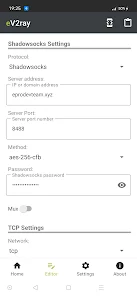
It's important to note that V2Ray clients do not create personal servers for users. If the configuration is incorrect or the server is no longer active, the connection may fail even if the app is running normally. Therefore, when encountering errors, it's recommended to first check the configuration and server before adjusting other settings.
Tips and Instructions for Using e-V2ray
First, prepare a V2Ray configuration from a reliable source. Open e-V2ray, enter or paste the corresponding configuration in the format supported by the app, then verify the server details before attempting to connect. If the app requests VPN connection permissions on Android, confirm the permission so the system can establish the network tunnel.
If you encounter connection issues, try checking the server address, connection port, authentication information, and protocol parameters one by one. If the current server is not responding, try configuring a different one. Don't rush to conclude that slow speed is due to the app, as server quality and network bandwidth also greatly affect actual performance.
Conclusion
e-V2ray is a dedicated V2Ray client for Android devices, helping users easily manage V2Ray connections directly on their phones. This application serves as a client role, supporting multiple V2Ray protocols and allowing connection setup through server configurations.
For optimal performance, users should focus on the quality of configuration and server, alongside choosing the appropriate client app. For those already familiar with V2Ray and needing a dedicated Android tool, e-V2ray is a good choice for managing connections as needed.