| Version | 2.80 |
|---|---|
| Size | 71 MB |
| Updated | Oct 1, 2026 |
| Category | Tools |
| Requires | Android 6.0 |
| MOD info | Premium |
| Google Play | com.smartphoneremote.androidscriptfree |
MOD features
- Premium Version
DroidScript is a dedicated programming environment for Android devices, allowing users to create and run applications directly on their phones, tablets, or Chromebooks using JavaScript and Python. The app integrates an on-device code editor while supporting WiFi Editor to write code via a computer web browser. With this approach, users can start developing Android apps without needing a traditional desktop programming environment.
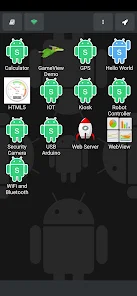
Direct Android Programming on Device
The highlight of DroidScript is the use of JavaScript and Python to build applications running on the Android operating system. Official documentation describes DroidScript as a scripting programming framework where users can create simple apps with just a few buttons or complex interfaces with dynamic graphical components.
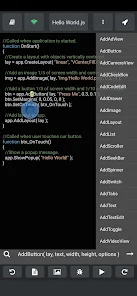
Instead of merely providing a text editor, the environment integrates numerous tools to interact with device components such as sensors, Wi-Fi, Bluetooth, camera, GPS, SD card, SMS, email, and the Internet. This facilitates various practical experiments, ranging from personal utility apps to device control projects or hardware communication.
Write Code in JavaScript and Python
DroidScript equips an integrated editor so users can create and edit scripts right on their phones. For projects requiring large amounts of code input, WiFi Editor allows opening the programming environment in a PC or Mac browser, making operations easier with a full-size keyboard. Official documentation also encourages using this method for extended coding sessions or projects with extensive code snippets.
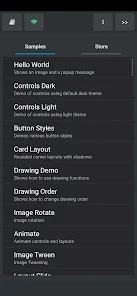
The app provides many sample examples so beginners can start from an existing project instead of building completely from scratch. Examples range from simple programs like Hello World to templates with web interfaces, Wi-Fi, or phone-to-computer communication.
Plugins Expand DroidScript Capabilities
DroidScript includes an essential component which is the plugin system. These plugins can expand the functionality of the DroidScript app, such as scanning QR codes and barcodes, controlling GoPro cameras, connecting MOGA gamepads, or interacting with specific hardware devices. The official plugin list also includes APKBuilder – a tool that helps build APK packages to share apps or upload them to Google Play.
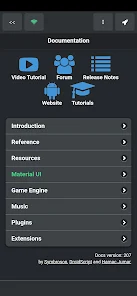
DroidScript also provides a Plugin SDK so developers can create their own custom plugins. The SDK documentation states that plugins can be developed using Android Studio or compatible tools, and then installed into the DroidScript plugin directory. This ecosystem helps extend the capabilities of the programming environment far beyond its default features.
Tips and User Guide for DroidScript
When starting out with DroidScript, you should try a simple sample project first to get familiar with the app structure. Afterward, you can create a new app, design the interface using basic components, and run it directly on your device to check its effectiveness. The official documentation emphasizes that layout is a fundamental element in the app development process, so you should master interface arrangement before starting to build complex features.
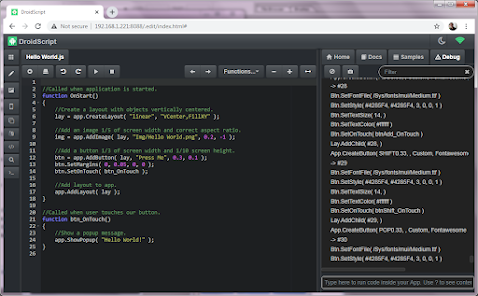
If you frequently code, connect your phone to the same Wi-Fi network as your computer and use the WiFi Editor for long code snippets. When you need special features, you should check the plugin list before building them from scratch yourself. For large projects, you should also organize your source code and resources into separate folders; DroidScript's project structure supports directories for HTML, audio, images, and other resources.
Conclusion
DroidScript brings a unique approach to Android app development by bringing the programming environment directly to your mobile device. Featuring JavaScript and Python, a built-in editor, WiFi Editor, sample libraries, and a plugin system, this app is perfect for learning to code, quickly testing ideas, or building small Android utilities without needing a complex desktop IDE. Once you are familiar with DroidScript's project structure and APIs, you can continue expanding your apps through plugins and advanced development tools.