
Start Running. Zero to 5K APK 26.09.14
⬇ Download APK (9 MB)| Version | 26.09.14 |
|---|---|
| Size | 9 MB |
| Updated | Oct 1, 2026 |
| Category | Tools |
| Requires | Android 8.0 |
| Google Play | com.axiommobile.running |
MOD features
- Premium version.
Start Running is a powerful tool for those who are just starting out with running, applying a method that combines running and walking. Instead of forcing users to exercise continuously from the beginning, the app helps gradually build endurance according to their physical condition and form a regular workout habit. Start Running integrates a virtual coach, audio guidance, GPS tracking, and detailed post-workout reports.
Overview of Start Running
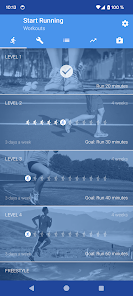
A big plus of Start Running lies in its exercise system divided into 4 levels with increasing challenges. The basic level starts with a 20-minute running goal, then upgrades to 35, 40, and ends at 60 minutes. Each phase lasts for 4 weeks with a frequency of 3 sessions per week, providing a scientific and accessible roadmap for beginners.
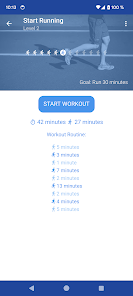
During the workout, you can completely adjust your pace to suit your ability instead of being constrained by a specific metric. Thanks to the voice guidance feature that announces the time to switch between running and walking, users do not need to glue their eyes to the phone screen and can still fully focus on their stride.
Running roadmap for beginners
Start Running helps beginners get familiar with this sport through alternating running and walking paces. When physical stamina is better, the running time will be extended in subsequent milestones. Breaking down goals into phases makes it easier for trainees to conquer instead of hastily demanding long distances from day one.
Besides available training plans, the app also supports users in designing their own separate workouts. This function is very convenient when you want to proactively change running and walking times or arrange your schedule to fit your personal routine.
GPS tracking and detailed summary of each run
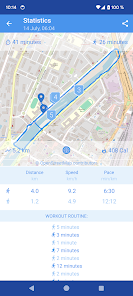
In addition to sample exercises, Start Running also accurately records distance, speed, pace, and route maps via GPS. The software also counts steps and calculates calories burned, providing much useful information about the training process. All these data will be stored for you to easily compare your daily progress.
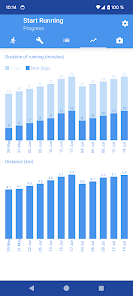
Since the app relies on GPS technology, the accuracy of the distance and route can be affected by satellite signals or the surrounding environment. When exercising outdoors, you should wait for the GPS connection to stabilize completely before starting to avoid errors.
Tips and instructions for using Start Running effectively
When first using Start Running, you should start from the easiest level instead of jumping to heavy workouts. Maintain a moderate pace, control your breathing well, and follow the resting walking intervals. If you feel too tired, do not hesitate to slow down or rest more instead of overexerting yourself.
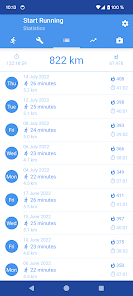
To collect accurate results, grant location access and hold your phone securely while moving. After finishing the workout, you can check the GPS route, speed, and distance to evaluate the results. The app has a security mechanism that encrypts personal and health data during transmission and allows users to request data deletion at any time.
Start Running acts as a training assistant and cannot replace medical advice or professional prescriptions from a doctor. If you are experiencing health issues, injuries, or have been inactive for a long time, choose a gentle level and consult an expert before starting.
Conclusion
Start Running is the perfect solution for anyone who wants to start running systematically using the run-walk combination method. Featuring leveled training plans, audio guidance, GPS tracking, detailed statistics, and the ability to create custom workouts, the app provides the necessary foundations to maintain a daily exercise habit. This is definitely a powerful assistant on Android devices to kickstart your health training journey.







