
Revo Uninstaller MOD APK 3.5.360G (Premium)
⬇ Download APK (47 MB)| Version | 3.5.360G |
|---|---|
| Size | 47 MB |
| Updated | Oct 1, 2026 |
| Category | Tools |
| Requires | Android 8.0 |
| MOD info | Premium |
| Google Play | com.vsrevogroup.revouninstaller |
MOD features
- Premium.
Revo Uninstaller is a software that helps users manage and uninstall apps on the Android operating system, focusing on removing leftover files or folders after a standard uninstallation. Instead of just using the system's default tool, users can preview lingering data before performing a complete deletion. This application is developed by VS REVO GROUP OOD and currently offers both free and Pro versions, packed with various advanced management features.

Overview of Revo Uninstaller
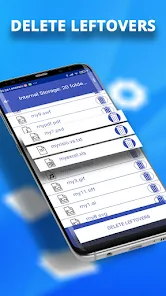
A standout feature of Revo Uninstaller is its ability to scan for leftover data after an app is removed from the device. According to Google Play data, the app displays related files for users to review before proceeding with deletion, helping to prevent the accidental deletion of important data. This feature is ideal for those who frequently install, test, and uninstall multiple apps on their phones.

Besides uninstalling apps, Revo Uninstaller also supports searching and sorting the list of software based on various criteria. Users can view information such as app name, version, installation date, APK size, cache, and app data before making a removal decision.
Uninstall apps and scan for leftover data
The process of using Revo Uninstaller is very straightforward. Users simply select the unnecessary app, proceed with uninstallation, and then review the remaining data parts detected by the tool. The app also supports batch uninstallation, displaying the number of selected apps and the total storage data to be cleared. This is especially useful when needing to handle multiple software items in one go.
An important note is that Android has limitations regarding third-party management apps. Revo Uninstaller cannot remove pre-installed system apps due to OS restrictions. Therefore, this tool is primarily used for handling user-installed apps.
App Management and Pro Features
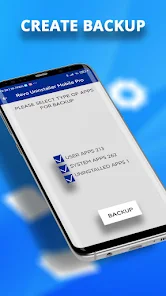
The Pro version of Revo Uninstaller brings many advanced tools for users who want more in-depth app management. Users can create backups of app info, compare backup lists with the current status, and categorize apps into custom groups. This version also supports creating separate categories to make searching and management much easier.
Additionally, the app features an uninstall history, app permissions checker, dark mode, and custom font sizes. These features help transform Revo Uninstaller from a simple tool into a comprehensive app management utility on Android.
Tips and Guide for Using Revo Uninstaller
When you want to uninstall an app, you should check its name, version, and size before proceeding. After uninstallation, carefully review the list of leftover data displayed by Revo Uninstaller. Do not delete a file just because its name seems related to the app, especially if the device contains important data.

If you frequently test various apps, use the search, filter, and categorization features to manage your list more easily. For important software, consider backing up before performing data deletion tasks. At the same time, keep in mind that the tool cannot bypass the system app removal limitations set by Android.
Conclusion
Revo Uninstaller is a useful tool for anyone looking to control the app uninstallation process on Android and check for leftover files afterward. The ability to batch uninstall, search, filter, view detailed info, and utilize additional Pro features makes app management a breeze. If you frequently test various software on your phone and want to proactively check data after uninstallation, this is a worthwhile utility to experience.