
| Version | 1.1.25 |
|---|---|
| Size | 65 MB |
| Updated | Oct 1, 2026 |
| Category | Tools |
| Requires | Android 7.0 |
| MOD info | Premium |
| Google Play | com.executionhelper.habittick |
MOD features
- Premium.
HabitTick is an Android habit tracking app that integrates to-do lists and daily planning tools. The app allows users to combine habits, tasks, and schedules in one unified space, rather than simply marking them as complete. Users can set daily, weekly, or multiple daily goals, track streaks, and review progress through history.
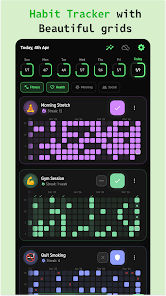
Track habits and build streaks
The standout feature of HabitTick is its visual habit tracking system. Users can create simple habits like reading, exercising, meditating, or morning routines. Each time a habit is completed, just mark it to update progress.
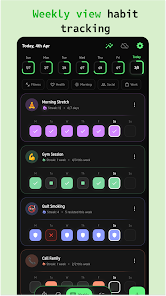
The app also provides habit history and streak tracking to help users monitor their consistency over time. In addition to daily goals, HabitTick supports weekly habits or multiple daily occurrences, making it ideal for frequent recurring activities.
Habits, To-dos, and Time-based Tasks
HabitTick isn't just for habit tracking. The app also integrates a to-do list for managing daily tasks. For time-sensitive activities, users can utilize the timer-based habit feature with an integrated stopwatch.
This combination helps you manage both long-term goals and daily small tasks. For example, 'exercising' can be a habit, while 'buying workout gear' or 'preparing a workout schedule' can be added to your task list.
Daily Planning and Reminders
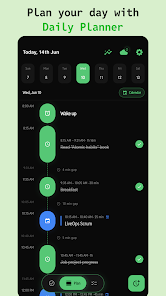
Another highlight of HabitTick is its timeline-based daily planner. Users can arrange habits, tasks, and schedules into time slots throughout the day to visualize their routine, identify gaps, and prioritize important activities.
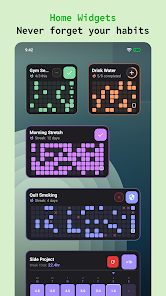
The app also supports reminders for habits and tasks. The latest update allows setting reminder times based on actual completion or ahead of deadlines from a few minutes to a day, and can be applied to recurring tasks. The habit tracking widget has also been improved to display measurable or time-based habits.
Tips and Guide for Using HabitTick
To make HabitTick work effectively, you should start by creating some practical habits instead of adding too many goals at once. For example, you can begin with activities like exercising, reading books, or learning English. Then, add specific tasks to the Todo section to clearly distinguish between daily work and long-term habits that need to be maintained.
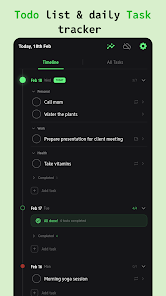
For activities with a defined duration, you should use the hourly habit feature to track the time spent on completion. If there is a deadline for completion, add it to the Daily Planner and set up reminder notifications before the required completion time. This approach helps you avoid the situation where your to-do list becomes too long without clear priorities.
Conclusion
HabitTick is the ideal app for those who want to integrate habit tracking, task management, and planning in a single environment. With features like streaks, progress history, habit timer, reminders, Daily Planner, and widgets, maintaining daily habits becomes much easier and more intuitive. If you're looking for a simple tool to turn goals such as exercising, studying, or reading into regular daily actions, then HabitTick is a worthwhile choice to try.







