Game Mode: Launcher & HUD MOD APK 6.2.2 (Premium)
⬇ Download APK (27 MB)| Version | 6.2.2 |
|---|---|
| Size | 27 MB |
| Updated | Oct 1, 2026 |
| Category | Tools |
| Requires | Android 6.0 |
| MOD info | Premium |
| Google Play | com.g19mobile.gamebooster |
MOD features
- Premium Version
Game Mode is a tool that helps players monitor and control device status while gaming. Instead of directly interfering with game files or trying to tweak FPS, this app focuses on checking metrics such as RAM usage, battery temperature, network latency, screen refresh rate, and other information provided by the Android operating system. Users can also organize all installed games in one place for quick and easy launching.
Game Management and Device Monitoring
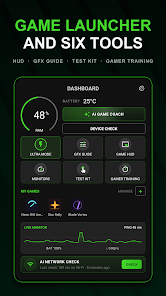
The highlight of Game Mode is its built-in game launcher. Users can add installed games to a list and launch them directly from the app. Before starting, Game Mode checks memory capacity, ping, and battery temperature, while displaying metrics that exceed thresholds for easy tracking.
The app also supports home screen widgets and individual shortcuts for each game. Thanks to this, you can quickly access your games without having to search among many other apps on your phone.
HUD Display for In-Game Information
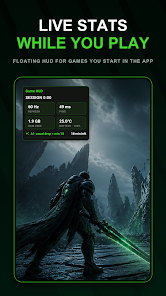
A standout feature of Game Mode is the Floating HUD. Once granted permission to display over other apps, a floating info panel appears while you are playing games. The HUD displays session duration, screen refresh rate, available RAM, battery temperature, and latency to public DNS servers.
Note that these metrics do not correspond to the actual in-game FPS or game server ping. For example, the app displays the refresh rate in Hz rather than FPS, and network latency is measured to public DNS instead of the game's servers. Therefore, this is a device monitoring tool, not a professional game performance benchmark.
AI Game Coach and Session History
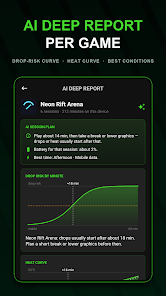
Game Mode also features an AI Game Coach that uses data from recorded sessions on the device to detect when the refresh rate drops or the phone temperature reaches around 40°C in each game. The app can predict stability, battery drain, and temperature during gameplay. The developer also states that the data used for these predictions is not uploaded to servers.
When HUD is enabled, eligible gaming sessions will be recorded with details such as duration, refresh rate, network latency, peak temperature, battery consumption, and other network information. Users can review their session history and export summaries as images.
Tips and Guide for Game Mode
When starting to use Game Mode, add the games you frequently play to your favorites list. Before starting a session, you can quickly check RAM usage, device temperature, and network information to assess your device's condition before launching a game.
If you want to monitor your phone while playing, enable Floating HUD and grant the "Display over other apps" permission. However, do not focus too much on a single metric. For example, the ping displayed by Game Mode is the connection to a public DNS, not the actual latency to the game server.
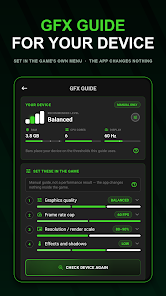
Game Mode also features Device Check and Test Kit to check RAM, storage, battery, network, touch sampling rate, touch points, refresh rate, resolution, HDR, dead pixels, and controllers. These tools are read-only and cannot fix hardware issues. The app also includes a GFX Guide that suggests default graphic configurations based on your hardware, though users need to adjust the in-game settings themselves.
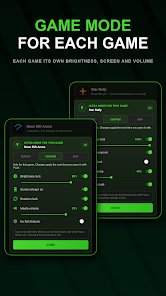
If you want to minimize interruptions while gaming, Ultra Mode can keep the screen awake, disable auto-rotate, and apply volume configurations; Focus Mode can enable Do Not Disturb. These options will be restored when you return to the app.
Regarding security, Google Play states that the app may share app activity, performance info, and device IDs with third parties. The app may also collect financial data, app usage, and other types of information; data is encrypted in transit, and according to Google Play, data deletion cannot be requested.
Conclusion
Game Mode is ideal for anyone who needs an all-in-one dashboard to manage games along with device monitoring tools. The app provides a game launcher, floating HUD, hardware check, playtime tracker, AI Game Coach, network analyzer, GFX Guide, and Ultra or Focus modes. Most importantly, Game Mode does not directly alter gameplay, boost FPS, or reduce ping; its core value lies in providing detailed insights to help users better understand their device's status while gaming.