
VPN Indonesia MOD APK 1.8.5.7 (Unlock)
⬇ Download APK (32 MB)| Version | 1.8.5.7 |
|---|---|
| Size | 32 MB |
| Updated | Oct 1, 2026 |
| Category | Tools |
| Requires | Android 7.0 |
| MOD info | Unlock |
| Google Play | free.vpn.secure.turbo.proxy.hotspot.vpnindonesia |
MOD features
- Unlock.
VPN Indonesia is a VPN app for Android devices that helps users connect to servers in Indonesia to obtain an IP address from that country. The app has a friendly, easy-to-use interface that allows connection with just a single tap, requires no account registration, and supports multiple network types.

Overview of VPN Indonesia
VPN Indonesia is designed for those who want to change their IP address to the Indonesia region or test access to online services from that country. After a successful connection, the device will use the VPN server's IP address instead of its current IP.
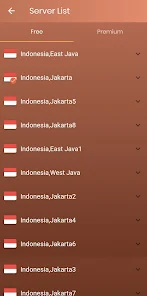
According to the developer, the app supports VPN connections without an account and without data limits. In addition to Indonesian servers, users can also choose servers in many other countries from the list. The VPN Filter feature helps you select which apps will use the VPN connection.
Fast connection to an Indonesian IP
One of the standout features of VPN Indonesia is the ability to connect to an Indonesian server with just one tap. This is convenient for users who don't want to manually configure complex settings. The app supports Wi-Fi and many types of mobile networks, making it suitable for various connection environments.

If a server is overloaded or the speed is unstable, users can switch to another server. Geographic distance, the number of connected users, and current network quality all affect VPN speed, so actual speeds may vary depending on the time.
Support for changing IP and filtering apps
VPN Indonesia is useful when you need an Indonesian IP address to check websites or online services by region. The VPN Filter feature also lets users choose which apps will go through the VPN instead of routing all of the device's network traffic.
According to information from Google Play, the app does not share data with third parties per its Data Safety declaration, but it may still collect information about app performance and device ID or other IDs. Data is encrypted in transit, and Google Play currently does not allow data deletion requests. Since a VPN handles network traffic, users should read the privacy policy carefully before use.
Tips for using and guide to VPN Indonesia
After installing VPN Indonesia, open the app and grant permission to create a VPN connection when Android prompts you. Select an Indonesian server, then tap the connect button. After a successful connection, check your IP address again with an IP-checking service to confirm the device is using the VPN server's IP.
If the speed is slow, try disconnecting and then selecting another server. When you only need a VPN for a specific app, you can use the VPN Filter feature if the current version supports it. A VPN should not be considered an absolute security tool; when logging into important accounts, users should still check for HTTPS, protect their passwords, and enable two-factor authentication when necessary.
Conclusion
VPN Indonesia is an Android tool focused on connecting to Indonesian servers and changing your IP address with simple actions. One-tap connection support, no registration required, multiple servers, and the VPN Filter feature make the app suitable for users who need a VPN for specific purposes. However, speed and stability may vary depending on the server and network in use, so it's best to test before relying on it for activities that require a stable connection.







