
Vocal Remover MOD APK 2.5.4 (Premium)
⬇ Download APK (149 MB)| Version | 2.5.4 |
|---|---|
| Size | 149 MB |
| Updated | Oct 1, 2026 |
| Category | Music & Audio |
| Requires | Android 7.0 |
| MOD info | Premium |
| Google Play | com.easeus.vocal |
MOD features
- Premium Version.
Vocal Remover is a specialized AI-powered software designed to filter vocals, separate instruments, and isolate beats from any song. Released by EaseUS and available on the Google Play store under the name Musiclab, it offers powerful features such as AI Audio Splitter, custom background music creation, noise reduction, and independent audio component exporting. This is truly an essential tool for artists, singers, vocal trainees, or anyone simply looking to DIY a karaoke track from their favorite songs.

Smart audio separation powered by AI
The biggest plus of Vocal Remover is its ability to dissect a song into detailed audio layers. Instead of simply erasing the lyrics, Musiclab can accurately identify and separate vocals, drums, guitars, basses, pianos, strings, and countless other instruments. Thanks to this, you have full control over choosing the audio parts you want to keep or fine-tuning the volume of each component according to your usage purpose.
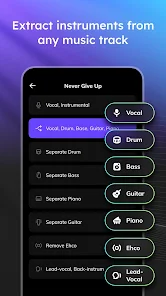
This utility allows users to import files in both audio and video formats, while also supporting direct data retrieval from Google Drive, Dropbox, iCloud, or public URLs. Popular formats mentioned by Google Play include MP3, WAV, and M4A. As soon as the processing is complete, you can easily adjust each track, mute sounds, or change the volume before saving your desired mix.
DIY standard karaoke and instrument beats
With Vocal Remover, one of the most practical applications is creating backing tracks from existing songs. By completely removing the vocalist's voice, you instantly get a perfect background melody to practice singing karaoke or for live performances. Additionally, the app supports exporting separate tracks like acapella, drums, guitar, or piano for users to freely create and edit further as desired.
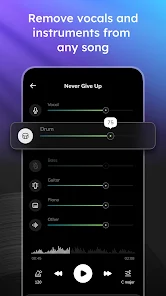
Separating individual instruments is also very useful for those learning to play music. For example, you can lower the volume of the guitar or bass to easily practice along with the song's rhythm, or keep a few basic instruments to create a fresher and simpler remix.
Effective noise reduction and individual track fine-tuning
Besides vocal separation, Vocal Remover comes with a built-in noise filter to enhance audio clarity. Right after the AI system finishes separation, you have the freedom to adjust the volume of each track, mute unnecessary parts, or blend them to create a completely new mix.

However, actual separation efficiency heavily depends on the quality of the original recording. Songs with excessive echo, reverb, or overlapping instrument layers can sometimes result in audio parts not being completely filtered out. Therefore, you should listen back and carefully check the results before using them in recording projects or official products.
Tips and user guide for Vocal Remover
When starting out with Vocal Remover, you should prioritize high-quality tracks with minimal noise so the AI system can easily recognize and separate them more accurately. After uploading the file, patiently wait for the app to finish processing and preview each single track before exporting.
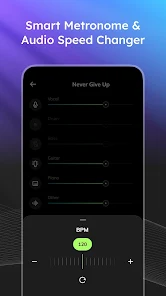
If your goal is to make karaoke music, reduce or completely mute the vocal track to check the background beat. Conversely, if you use it for instrument practice, keep the guitar, piano, or drum tracks and lower the rest. When you need a complete mix, remember to adjust the volume of each component before exporting rather than editing the song globally.
An important note is that you need to comply with copyright issues when processing and sharing songs that do not belong to your personal ownership. Separating music for private entertainment is entirely different from distributing or using edited mixes for commercial purposes.
Conclusion
Vocal Remover brings an intelligent AI-based audio processing ecosystem, scoring absolute points with its ability to separate vocals and numerous instruments from original songs. From making karaoke, creating background music, extracting acapellas to supporting instrument practice, this app fulfills all needs. Furthermore, the noise reduction feature and detailed track customization will help you easily create your most satisfying audio works before exporting.