
| Version | 15.0.1 |
|---|---|
| Size | 29 MB |
| Updated | Oct 1, 2026 |
| Category | Music & Audio |
| Requires | Android 7.0 + |
| MOD info | Premium |
| Google Play | app.symfonik.music.player |
MOD features
- Premium version.
Symfonium is an Android music player developed to combine various music sources into a single space. You can enjoy songs stored locally on your device, connect to NAS, media servers, cloud storage spaces, or familiar platforms like Plex, Emby, Jellyfin, Subsonic, and Navidrome. Besides organizing your library, Symfonium also integrates offline listening, an equalizer, lyrics display, and audio casting to supported devices.
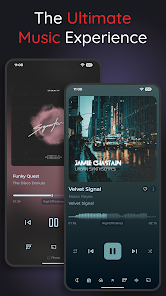
Overview of Symfonium
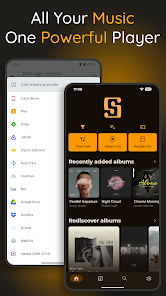
A major plus of Symfonium lies in its ability to synchronize multiple sources into a single platform. Instead of struggling to switch between your phone's player, home server, or cloud storage, you can easily access all compatible music libraries through a single interface. This utility is compatible with device storage, Plex, Emby, Jellyfin, Audiobookshelf, Subsonic, OpenSubsonic, Navidrome, Kodi, SMB, WebDAV, and several other online storage services.
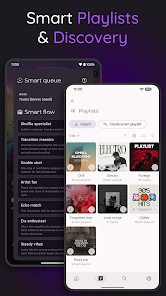
Additionally, Symfonium focuses heavily on user interface personalization. You can completely customize layouts, tabs, shortcuts, and the overall interface according to the Material You standard. The smart playlist system supports creating playlists based on various criteria such as artist name, genre, release date, listening history, or favorite status, making the management of massive music collections simple.
Hi-Res audio quality and professional processing tools
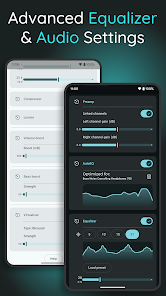
For those with high audio standards, Symfonium is equipped with a processing engine that supports Hi-Res PCM, DSD, and DoP formats on compatible hardware. The software also works well with USB DACs, Android DAPs, and USB bit-perfect mode for suitable Android devices. The dedicated 64-bit DSP system for local music libraries combined with ReplayGain, PEQ, GEQ, AutoEQ, and crossfeed helps users optimize sound quality according to their devices or personal listening tastes.
The application is compatible with a rich set of audio formats such as FLAC, ALAC, Opus, AAC, MP3, M4A, DSD, AIFF, APE, WavPack, and many other standards. Depending on the capabilities of your phone, DAC, or playback device, you can flexibly choose appropriate audio parameters instead of being restricted to the default Android settings.
Flexible music playback from servers, clouds, and external devices
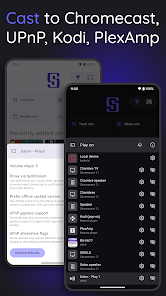
Symfonium supports streaming audio to Chromecast, UPnP/DLNA, Kodi, and many other compatible devices. The program also integrates a data buffering mechanism to serve offline listening needs, which is extremely useful when the connection signal to the server or cloud encounters issues. For those on the go, Android Auto allows managing your music collection right while driving, while Wear OS supports syncing songs and playlists to enjoy directly without needing your phone nearby.
Not stopping at music, Symfonium also supports listening to audiobooks thanks to functions for customizing speed, pitch, skipping silence, and remembering the listening position. The application also supports displaying synchronized lyrics, with lyrics embedded directly in the file or provided by media service providers.
Tips and instructions for using Symfonium
During the installation process of Symfonium, you should add each music source according to your actual needs rather than linking too many services at once. If you own a collection on a NAS or a private server, double-check the connection and folder system before creating playlists. For music stored directly on your device, running the library scan and reviewing song information features will make searching for albums or artists significantly more convenient.
If you are using high-end headphones or a DAC, experiment with PEQ, GEQ, or AutoEQ filters to set up a custom profile for each device. When streaming music from a server over mobile data, enabling offline caching in advance will minimize stutter and lag. Note that Symfonium is a player for legal content that you have the right to own; the application absolutely does not support playing or downloading data outside of the user's authorized rights.
Conclusion
Symfonium is the ideal Android music player for anyone who wants to manage their entire audio collection from multiple sources into a single application. Thanks to its diverse connectivity with servers, NAS, clouds, local music libraries, along with Hi-Res technologies, 64-bit DSP, equalizer, smart playlists, offline listening, and flexible streaming, this software fully meets everything from casual listening needs to complex audio systems. For users with massive personal libraries or running a home media server, Symfonium provides a centralized, smooth way to manage and enjoy music.