
Stellio MOD APK 7.0.8 (Premium)
⬇ Download APK (45 MB)| Version | 7.0.8 |
|---|---|
| Size | 45 MB |
| Updated | Oct 1, 2026 |
| Category | Music & Audio |
| Requires | Android 6.0 |
| MOD info | Premium |
| Google Play | io.stellio.music |
MOD features
- Premium.
Stellio is a music player application on Android, designed for those who want deeper control over their audio experience and playback interface. This tool integrates a powerful audio engine with a 12-band equalizer, various sound effects, high-res audio compatibility, along with crossfade and gapless features. Beyond just sound, Stellio also offers interface personalization, lyrics display, album art and tag customization, and professional management of your personal music library.
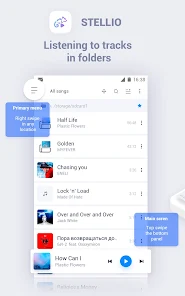
Overview of Stellio
The most notable highlight of Stellio is its extremely detailed audio optimization capability. The 12-band equalizer allows users to freely fine-tune each frequency band or quickly apply preset settings. Furthermore, the app integrates multiple sound effects, a crossfade feature for smooth track transitions, and a gapless playback mode which is extremely useful for uninterrupted listening to full albums or continuous recordings.

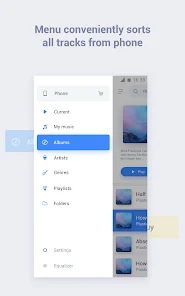
Stellio smoothly supports currently popular audio formats such as MP3, FLAC, CUE, APE, and M4A. The music library can be flexibly arranged by album, artist, genre, or folder, making it ideal for those who have the habit of storing their song collections directly on their phone. This software also meets the demand for high-resolution music playback depending on your hardware and music source.
Equalizer and Audio Quality Customization
With Stellio, you can start with available presets and then perform manual fine-tuning to build a unique musical taste for yourself. The 12-band equalizer proves extremely effective when you want to boost bass, mid, or treble to suit different headphones or music genres. However, avoid overusing excessive boosts on any single frequency band as it can lead to distortion or ear fatigue during long listening sessions; make gradual adjustments at a moderate volume level.
The crossfade feature maximizes its effect when you enjoy long playlists and want to eliminate silence between tracks. Conversely, gapless playback is the perfect choice for concept albums or live tracks that need to maintain seamless continuity. These are major advantages for users passionate about offline music listening.
Lyrics, Interface, and Library Management
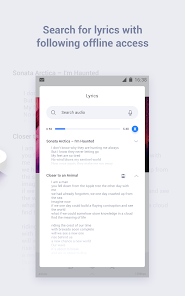
Alongside its audio strengths, Stellio also brings a very intuitive data management toolkit. Users can easily search, update album art, edit tags, or browse the music library by album, artist, genre, and folder. The app also supports looking up online lyrics and saving them for offline viewing whenever needed.
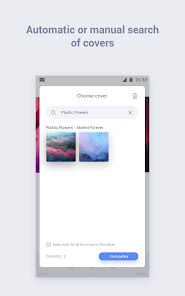
The interface of Stellio possesses its own unique flair thanks to the ability to automatically change colors according to the tone of the currently playing album cover, creating a wonderful visual connection. Besides the default interface, you can install additional themes to refresh the player. Widgets and notification panels can also be customized freely to personal preferences.
Tips and Usage Guide for Stellio
When first installing Stellio, you should scan and reorganize your entire music folder, while carefully checking tags and album art so that future searches go smoothly. If you listen to many different genres of music, create your own separate equalizer presets instead of using a single configuration. When experiencing new headphones, remember to start at a low volume level and then gradually increase each frequency band to find the most satisfying sound quality.
For those who have the habit of listening to music before going to sleep, the Sleep Timer feature helps automatically turn off music after a certain period of time or a specific number of tracks. Stellio also supports quick control via headphone buttons, volume buttons, or shake gestures, which is extremely convenient in many situations.
Conclusion
Stellio is the ideal music player for those who demand maximum control over their music library and sound quality on Android devices. Thanks to the 12-band equalizer, professional effects, crossfade and gapless modes, multi-format support, and a rich theme system, this app delivers a thoroughly complete experience. If you frequently enjoy pre-saved music files on your device and love manually tweaking your audio, Stellio is definitely a name you cannot miss.