
| Version | 20260912 |
|---|---|
| Size | 98 MB |
| Updated | Oct 1, 2026 |
| Category | Tools |
| Requires | Android 7.0 |
| MOD info | Premium |
| Google Play | com.giamping.socks5 |
MOD features
- Premium.
SOCKS5 is an Android app that helps users connect to SOCKS5 proxy servers by creating a VPN tunnel using the Android VpnService API. The app supports both IPv4 and IPv6, allowing users to choose from available servers or manually enter their own SOCKS5 server details. The developer also notes that this is a SOCKS5-only tool and does not support Shadowsocks or any other VPN protocols.
What makes SOCKS5 special?
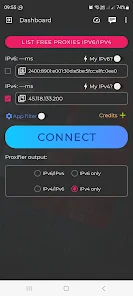
The standout feature of SOCKS5 is its ability to create a VPN tunnel on your Android device to route data through a selected SOCKS5 server. The app supports both IPv4 and IPv6 addresses while allowing users to customize the output IP address type. This makes the tool ideal for those who have their own SOCKS5 servers or want to use the servers provided within the app.
The app does not require account registration to set up a connection and supports quick, one-tap connecting. Alongside Wi-Fi, SOCKS5 also supports mobile data connections such as 3G and LTE. Furthermore, the app integrates a ping latency checker so users can check connection lag before selecting a server.
Connect SOCKS5 proxies with IPv4 and IPv6
With SOCKS5, users can connect via IPv4 or IPv6 addresses according to the server's requirements. The app allows for custom proxy parameter settings, so you are not limited to the servers available in the default list. This is a very useful feature for users who already have their own SOCKS5 server credentials and want to use them directly on their Android phones.
The app's working mechanism relies on the Android VpnService API to create a VPN tunnel. However, it is important to note that using Android's VPN interface does not turn SOCKS5 into a full VPN protocol. According to the Google Play description, this tool only connects to SOCKS5 servers and does not support Shadowsocks.
App Filter and Gaming Support
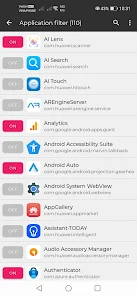
Another notable feature is the Application Filter. Instead of applying the tunnel to the entire device, users can handpick specific apps to use the VPN gateway. This helps control the connection scope and prevents unnecessary apps from routing through the SOCKS5 tunnel.
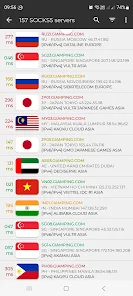
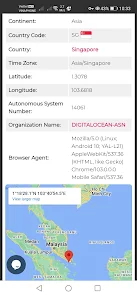
The developer also provides optimizations to enhance the gaming experience and minimize latency. However, the proxy feature does not guarantee that the ping will always be lower than a direct connection. Actual performance depends on the quality of the SOCKS5 server, geographical distance, network routes, and the game server itself. Therefore, users should check their actual ping before applying it in gaming sessions that require a stable connection.
Tips and Usage Guide for SOCKS5
First, verify the server information including the IP address, port, and authentication parameters if necessary. If using a pre-configured server, it is recommended to check the Smart Ping and select a server with suitable latency. Once configured, Android will display a VPN connection permission request; only confirm if you fully understand that your traffic will be routed through the selected proxy.
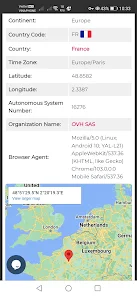
If you only want certain apps to use the proxy, set up an Application Filter instead of enabling the tunnel for the entire device. For games, it is best to test the connection for a short period before long-term use to evaluate stability, ping, and disconnection issues.
Conclusion
SOCKS5 focuses on fulfilling SOCKS5 proxy connection needs on Android via a VPN tunnel, while also supporting IPv4, IPv6, Smart Ping, and Application Filter. This tool is ideal for users who need to set up a private proxy or want to control which apps use the SOCKS5 connection. If used for gaming or browsing the web via a proxy, you should check the actual latency and stability rather than assuming that a proxy will always make the connection faster.







