

Ridmik Keyboard MOD APK 18.6.1 (Premium)
⬇ Download APK (49 MB)| Version | 18.6.1 |
|---|---|
| Size | 49 MB |
| Updated | Oct 1, 2026 |
| Category | Tools |
| Requires | Android 6.0 |
| MOD info | Premium |
| Google Play | ridmik.keyboard |
MOD features
- Premium version.
Ridmik Keyboard is an Android keyboard that stands out for supporting both Bangla and English input within the same interface. The app offers a variety of typing methods, word suggestions, voice input, an emoji system, and a customizable interface, making it suitable for those who frequently use Bangla on their phones. According to Google Play, the app has surpassed 100 million downloads and was updated in September 2026.
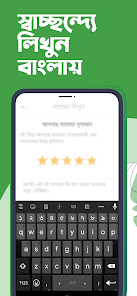
General introduction to Ridmik Keyboard
Ridmik Keyboard provides a Bangla phonetic typing method, allowing input based on pronunciation similar to the Avro approach. In addition, the app includes National and Probhat layouts so users can choose how to type according to their habits. Ridmik also makes it easy to switch between Bangla and English when messaging, taking notes, or searching for information.
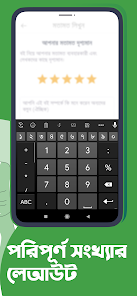
Not only does it serve text input, but the keyboard also features emojis, next-word suggestions, a clipboard that saves recently copied content, and a quick text editing tool. Users can adjust the keyboard height for portrait or landscape mode, making typing more comfortable across different screen sizes.
Fast, convenient Bangla typing
The highlight of Ridmik Keyboard lies in its support for multiple Bangla input methods. With the phonetic method, users can type based on sounds close to familiar pronunciation without needing to memorize all character positions. The next-word suggestion feature also reduces manual input when writing commonly used sentences.
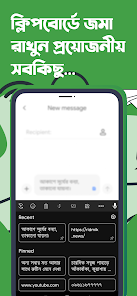
The app also supports continuous voice input. When you need to quickly write a paragraph or a long message, you can use your voice instead of tapping each key. Ridmik also offers options for the number row, emojis, and the ability to move the cursor by holding and dragging on the spacebar.
Flexible interface and keyboard customization
Beyond input functionality, Ridmik Keyboard lets you personalize your experience with various interface themes. Users can choose from available themes or use the theme creator to change the keyboard's appearance to their liking. The keyboard height can also be set separately for portrait and landscape screens.
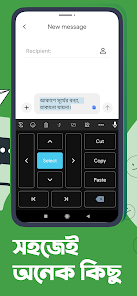
The app also supports Arabic and Chakma as language utilities, a clipboard for recently copied text, and a user dictionary to improve suggestions. According to Google Play, data is encrypted in transit, not shared with third parties, and users can request data deletion.
Tips and instructions for using Ridmik Keyboard
After installing, open your Android keyboard settings to enable Ridmik Keyboard and select it as your default input method if you want to use it regularly. If you're just starting out, get familiar with the phonetic typing method first. After that, you can try National or Probhat if you want to use a different layout.

To type faster, enable word suggestions, set up the number row if you frequently enter numbers, and adjust the keyboard height to match your screen size. When you need to find a recently copied passage, the built-in clipboard will save you time. For the voice feature, be sure to check microphone permissions and your network connection before use.
Conclusion
Ridmik Keyboard is a worthwhile choice for anyone who needs Bangla input on Android. The combination of multiple typing layouts, phonetic input, word suggestions, voice typing, emojis, clipboard, and interface customization helps the app meet needs ranging from messaging to document writing. If you frequently use Bangla and want a keyboard with plenty of personalization options, Ridmik Keyboard can be a useful tool to try.







