

| Version | 2.15.00 |
|---|---|
| Size | 91 MB |
| Updated | Oct 1, 2026 |
| Category | Tools |
| Requires | Android 8.0 |
| MOD info | Premium |
| Google Play | com.afternoonproducts.swipewipe |
MOD features
- Premium.
Photo Cleaner is a tool that helps Android users organize and clean up their personal photo gallery in the most intuitive way. Instead of manually searching through each folder to delete files in bulk, you simply swipe through each picture and decide whether to keep or discard it with simple swipe gestures. This method is extremely useful when your storage is cluttered with too many screenshots, duplicate files, blurry images, or redundant data.

Overview of Photo Cleaner
A major plus of Photo Cleaner is its ability to organize images by monthly timelines. You can easily browse through photos, videos, or screenshots in your camera roll, then swipe right to keep them or swipe left to delete them. Filtered months will be marked as completed, while unfinished sections can be resumed at any time.
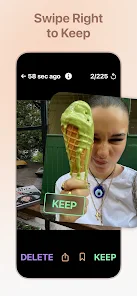
Additionally, the app brings a sense of nostalgia with its "On This Day" feature. This tool displays photos taken on the exact same day in the past right on the home screen, allowing you to reminisce while easily selecting valuable moments.
Quick photo cleanup with swipe gestures
The photo management experience on Photo Cleaner is exceptionally smooth and intuitive. As each image appears, simply swipe right to keep it or left to discard it. In case of a misclick, you can easily tap the photo to reverse your decision instantly.
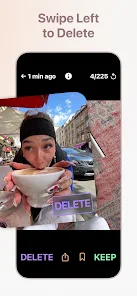
Furthermore, users can touch and hold a photo to check its metadata, as well as review the list of files marked to keep or delete before taking the final step. This acts as a second layer of protection, preventing the accidental deletion of important memories. In addition, the Bookmarks feature helps quickly tag pictures that need further consideration later.
Tips and instructions for Photo Cleaner
When starting out with Photo Cleaner, ApkUnlimit recommends breaking down the process month by month instead of tackling your entire photo library all at once. Prioritize clearing out periods with a large volume of junk photos, such as screenshots or temporary files. For images you are hesitant about, use the Bookmark feature instead of deleting them immediately.
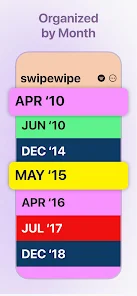
To keep track of your progress, the home screen clearly displays completed and incomplete months. Statistics also accurately reflect the number of reviewed photos and the amount of storage recovered. Besides, the On This Day widget is an interesting highlight that lets you clean your library while reflecting on the past.
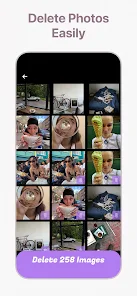
Before finalizing bulk deletions, make sure to carefully review your selections so you do not miss important files. Also, photo deletion and synchronization permissions may vary depending on your Android system configuration or storage services. According to safety data from Google Play, developers may collect activity information and device identifiers.
Conclusion
Photo Cleaner provides an extremely intuitive solution to restructure the photo library on Android devices. Thanks to its flexible swipe mechanism, monthly grouping, memory recommendation features, and detailed progress management, ApkUnlimit believes that clearing your storage will become easier than ever. This is definitely a powerful assistant if your collection is overloaded.







