

| Version | 2.0.1 |
|---|---|
| Size | 9 MB |
| Updated | Oct 1, 2026 |
| Category | Tools |
| Requires | Android 6.0 |
| MOD info | Premium |
| Google Play | com.emanuelef.remote_capture |
MOD features
- Premium version.
PCAPdroid is an open-source software on Android, specialized in monitoring, analyzing, and managing network connections of all apps on your device. This utility runs without needing root access by utilizing the local VPN feature to gather data; all information is processed directly on the phone instead of being sent through an intermediary VPN server.
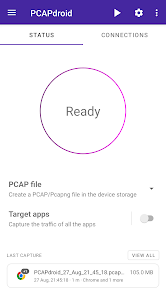
Overview of PCAPdroid
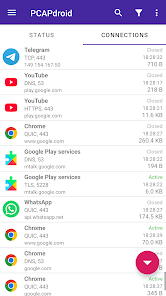
The notable highlight of PCAPdroid is its ability to let you clearly see which apps are accessing the network and how much data is being transferred. The software lists detailed servers, IP addresses, along with DNS, TLS, or HTTP data, making it easy for you to grasp the background activities of Android apps.
Unlike many network inspection tools that require root privileges, PCAPdroid allows packet capturing directly on the device via the internal VPN protocol. Thanks to this, you can check the data flow without needing system intervention or rooting the device. The entire source code is licensed under the GPL-3.0-or-later standard.
Monitor connections and app traffic
Through PCAPdroid, users can easily control connections from both system apps and installed software. The app provides a statistical table of sent and received data usage, while supporting filters to view each connection in detail. This is a big plus when you want to know which server an app is communicating with or find the cause of unusual data consumption.
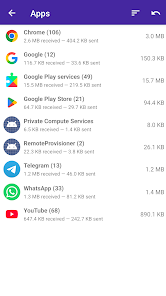
This tool also helps extract domain names and IP addresses from DNS and TLS, and supports looking up the country and ASN of the server based on intuitive offline data. This information is extremely useful for those who are knowledgeable about networking or need to check the behavior of a specific app.
Export PCAP files and in-depth analysis
Another powerful feature of PCAPdroid is saving network traffic into PCAP files. You can download this file or use PCAP-over-IP to inspect real-time data using software like Wireshark. The app also supports reading HTTP requests/responses and exporting data to HAR format.
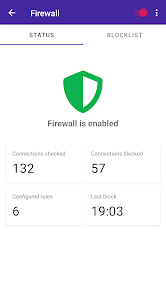
For tech-savvy users, the utility also supports HTTPS/TLS decryption when set up correctly and creates an SSLKEYLOGFILE. Some advanced functions like the firewall, malicious connection detection, and PcapNG file export belong to the paid version.
Tips and user guide for PCAPdroid
When first getting acquainted with PCAPdroid, you should selectively choose the apps to inspect instead of recording all traffic for a long time. After turning on the packet capture feature, pay attention to the connection list and exchanged data volume to detect anomalies. The filter will be a powerful assistant in narrowing down results when the phone runs many background apps.
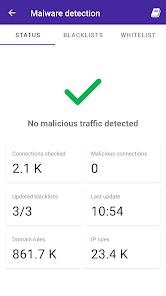
If you need to research more thoroughly, export the data to a PCAP file and transfer it to a computer for analysis using specialized software. HTTPS/TLS decryption requires precise setup and professional expertise; do not abuse viewing encrypted data without authorization. When using the firewall, set up rules one by one and re-check the app to avoid accidentally blocking important connections.
Conclusion
PCAPdroid is an excellent network monitoring solution for Android users who want to dive deeper into how apps connect to the Internet. The advantage of not needing root, flexible monitoring capabilities, standard DNS/TLS/HTTP analysis, along with the ability to export PCAP files to Wireshark help the app meet both personal needs and in-depth technical analysis. Average users can take advantage of basic features, while professionals will maximize this powerful packet capturing system.







