

| Version | 1.14 |
|---|---|
| Size | 9 MB |
| Updated | Oct 1, 2026 |
| Category | Tools |
| Requires | Android 8.0 |
| MOD info | Premium |
| Google Play | com.persapps.multitimer |
MOD features
- Premium.
MultiTimer is a highly flexible timer tool, perfect for those who need to manage multiple tasks at once. Instead of offering just a basic countdown timer, this utility allows you to set and activate multiple timers simultaneously for cooking, studying, physical training, work, or daily schedule management. You can fully customize each timer, organize them into separate tabs, and control all activities from a single interface.
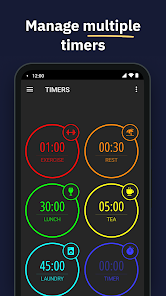
Overview of MultiTimer
The biggest strength of MultiTimer lies in its rich ecosystem of timers. This platform integrates various modes such as countdown, count-up, quick start, Pomodoro, interval timer, sports timer, number counter, clock, and convenient buttons. As a result, you save storage space by not needing to download multiple separate apps. A single display panel can group multiple timers, while independent panels help clearly separate different task groups.
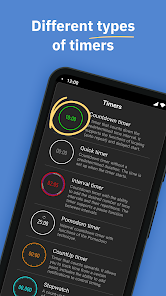
Additionally, the app's interface supports extremely flexible personalization. Users can easily copy, delete, or reposition timers, choose layouts, and enable full-screen mode for easier time monitoring. Each timer can be decorated with a custom name, color, icon, alarm type, sound, and notification settings.
Diverse Timers for Work, Study, and Sports
With MultiTimer, you can set a countdown timer for cooking, apply the Pomodoro technique for studying, and configure interval mode when working out—all without switching between multiple apps. The auto-repeat feature allows timers to restart automatically after each completion, ideal for cyclical habits.
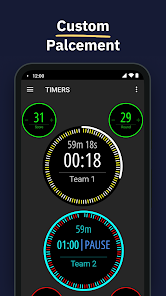
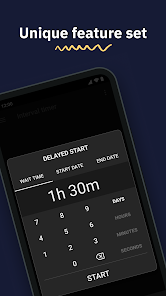
The app also supports delayed start settings, allowing you to add or subtract time even while the timer is running. All timer activity history is carefully stored, helping you review previous sessions. Moreover, convenient home screen widgets allow quick access and control of your time tracking.
Tips and How-to Guide for MultiTimer
When starting with MultiTimer, it's best to organize tabs by specific areas. For example, create one tab for work, another for exercise, and a third for household tasks. This method prevents timers from overlapping and makes searching easier.
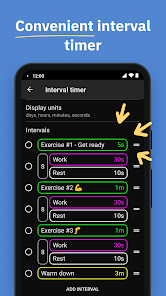
In studying, you can use the Pomodoro technique to break study time into focused intervals and rest periods. During physical training, interval timers are an excellent tool for managing workout and relaxation times. In the kitchen, countdown timers with alarm sounds help monitor dishes without constantly staring at the screen.
If you often reuse the same settings, take advantage of timer cloning and customize unique alarm sounds for each activity. MultiTimer also allows sharing timers via web links, exporting data to other devices, and controlling multiple clocks at once. Some advanced features are part of the Pro version, so your experience will depend on the version installed from ApkUnlimit.
Conclusion
MultiTimer is an ideal solution for those seeking a comprehensive time management app. From countdown timers, stopwatches, Pomodoro to interval timers, this tool offers high customization in interface, sound, and detailed history tracking. If you need to monitor multiple time frames in both work and daily life, MultiTimer on ApkUnlimit will make everything more organized and easier to manage.







