
Manga Translator MOD APK 3.1 (Premium)
⬇ Download APK (125 MB)| Version | 3.1 |
|---|---|
| Size | 125 MB |
| Updated | Oct 1, 2026 |
| Category | Tools |
| Requires | Android 8.1 |
| MOD info | Premium |
| Google Play | com.wiryaimd.mangatranslator |
MOD features
- Premium package.
Manga Translator is an Android app that translates dialogue in manga, manhwa, manhua, and many other comic genres directly from images. The app can automatically recognize text with OCR, convert the content into your desired language, and insert the translation right onto the image. According to published information, the app supports English, Japanese, Chinese, Korean, and more than 50 other languages.
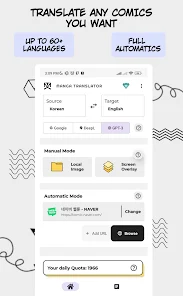
Explore Manga Translator's comic translation capabilities
The standout feature of Manga Translator is its ability to process content directly from images, so readers don't have to manually type each line of dialogue into a translation tool. The app can recognize text on a comic page, translate it, and render the result back onto the image so users can keep reading.
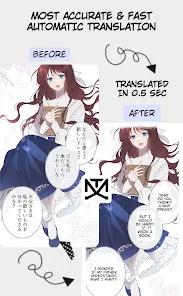
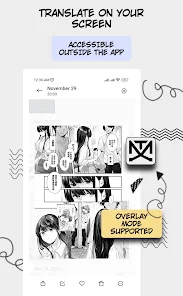
Besides choosing photos already on your phone, the app also has an Overlay mode to recognize content currently displayed on the screen. This feature is useful when users want to quickly translate a comic page without going through multiple intermediate steps.
Translate manga from images and the screen
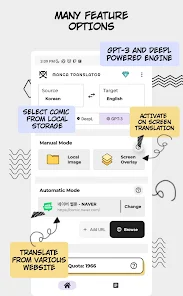
With Manga Translator, you can select the comic images you want to translate, rearrange the page order, and start processing. After recognizing the text, the app translates the content and automatically inserts the result into the image. This approach is suitable for manga with many speech bubbles that readers don't want to copy manually line by line.
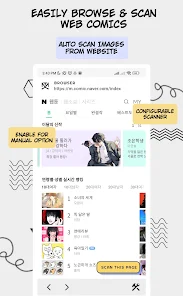
The app also includes a browser so users can find and view the comic pages they need to translate. In addition, you can paste the URL of a chapter and let the app automatically run the translation process. Results are saved locally and can be reviewed in the history section.
Supports a wide range of languages and optimized OCR
Manga Translator can translate between many languages, including those commonly encountered when reading manga and manhwa such as Japanese, Chinese, Korean, and English. Thanks to OCR text recognition, the app can handle content embedded directly in images rather than just translating plain text.
The August 25, 2026 update adds an advanced model to improve translation quality, upgrades OCR, and fixes issues related to Gemini. However, actual accuracy can still vary depending on image quality, font style, speech bubble layout, and source language.
Tips for using Manga Translator and how-to guide
When using Manga Translator, you should prioritize comic pages with clear images and dialogue large enough for OCR to recognize easily. For pages with too much text, complex layouts, or stylized lettering, recognition results may be less accurate.
If the translation appears in the wrong position or the content doesn't sound natural, you should check the original image and try processing the page again. For important lines of dialogue, treat the translation as a supporting tool and compare it with the original text when needed. Users should also be mindful of privacy when uploading images or online content into the app. According to published information, the app may share certain types of data such as location and device identifiers with third parties.
Final thoughts
Manga Translator offers a fairly convenient way to translate manga, manhwa, manhua, and comics directly from images. Thanks to automatic OCR, Overlay mode, a built-in browser, chapter URL support, and more than 50 languages, the app can help readers access content that doesn't yet have a familiar translation. If you frequently read comics in Japanese, Chinese, Korean, or other languages, this is a tool worth trying.







