

JEFIT-Gym Workout Tracker MOD APK 17.4.1 (Premium)
⬇ Download APK (165 MB)| Version | 17.4.1 |
|---|---|
| Size | 165 MB |
| Updated | Oct 1, 2026 |
| Category | Tools |
| Requires | Android 7.0 + |
| MOD info | Premium |
| Google Play | je.fit |
MOD features
- Premium.
JEFIT is software that helps you plan workouts, log training sessions, and track fitness progress on Android devices. The app offers a library of over 1,400 exercises, tools for building personal workout schedules, and a performance analysis system. The latest version has integrated adaptive planning and smart load-increase suggestions powered by AI based on your activity history.

JEFIT helps you plan your workouts
A standout feature of JEFIT is its ability to turn your phone into a workout logbook. Users can record weight, reps, sets, and notes after each session. You can also design your own exercises and workout schedules to match your goals, available equipment, or the muscle groups you want to focus on.
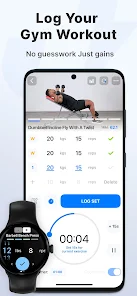
The app library now includes over 1,400 exercises with HD videos and illustrations. Exercises can be arranged into supersets, and users can set rest times, timers, or countdowns for each exercise.
Logging and tracking progress
With JEFIT, recording the results of each workout makes it easy to compare performance over time. The app provides charts for training volume, sets per muscle group, and balance between movements. The system can also automatically calculate 1RM for each exercise so users can track changes in strength.

Beyond workout metrics, you can log body weight, body fat percentage, and measurements such as waist, chest, arms, or legs. Combining body data with your workout log gives you more information when evaluating progress.
Adaptive plans and load-increase suggestions
A notable feature of JEFIT is Adaptive Plan. The system uses your goals, experience level, equipment, and workout history to build a personalized plan. AI can also analyze previous sessions to suggest weights and reps for your next workout.
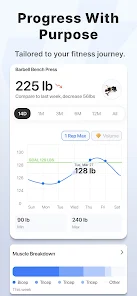
The app also provides muscle recovery charts and a muscle group map, helping users visualize which areas have been trained most during the week. However, the app's suggestions should be treated as supporting information; actual weights still need to be adjusted based on technique, physical condition, and how you feel during each session.
Tips for using JEFIT and guidance
When starting with JEFIT, create a workout schedule based on the number of days you can realistically maintain each week. After each exercise, enter the exact weight and reps rather than estimating so your history data is more valuable. You can also add notes about how you felt during training, your technique, or changes to make in the next session.
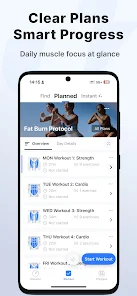
If you use the auto load-increase feature, don't increase weight just because the app suggests it. Prioritize proper technique and control of the movement. JEFIT also supports syncing workouts with Wear OS watches, tracking some information such as heart rate, sets, and calories during training.
The app has a free version and a JEFIT Elite package with additional tools such as adaptive AI Coach, advanced analytics dashboards, and the Elite program library.
Conclusion
JEFIT combines a gym log, planning, exercise library, and progress analysis in one Android app. From recording each set and weight to tracking 1RM, training volume, and AI-powered adaptive plans, the app offers many tools for those who want to manage their training more systematically. It's also a suitable choice for keeping a workout history and observing changes in strength, training volume, and body metrics over time.







