

Infuse MOD APK 1.1.3 (Unlocked)
⬇ Download APK (29 MB)| Version | 1.1.3 |
|---|---|
| Size | 29 MB |
| Updated | Oct 1, 2026 |
| Category | Tools |
| Requires | Android 8.0 |
| MOD info | Unlocked |
| Google Play | com.sapiens.assistant.ai |
MOD features
- Unlocked.
Infuse is an AI assistant for the Android operating system, designed to integrate artificial intelligence features into everyday app usage. Instead of constantly switching between your current app and a separate chatbot, Infuse lets users interact directly with AI in many situations such as drafting content, translating text, summarizing information, or developing ideas. This app is built by Sapiens Labs and currently contains ads as well as in-app purchases.

Infuse – AI assistance right inside your apps
One standout feature of Infuse is its ability to integrate AI with other apps on your phone. Users can use this assistant for help while browsing social media, composing emails, researching content, or performing text-processing tasks. This approach saves users time and minimizes copying or switching between multiple apps.
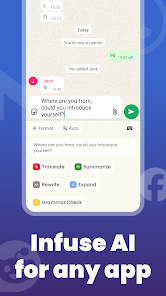
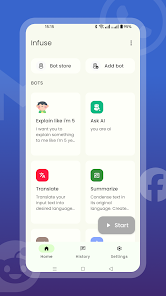
The app also lets you create and adjust AI roles for specific purposes. For example, you can set up an assistant specialized in writing content, a role for translation support, or an assistant to help develop ideas. As a result, the AI's responses can be tailored to suit each type of task.
AI for writing, translation, and research
During everyday work, Infuse can help rewrite sentences, generate content, summarize articles, or extract important information from text. The AI feature can also be used to translate languages and support communication while you're using another app.
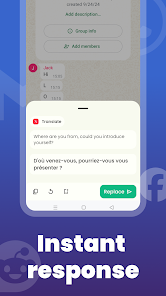
For people who work with content regularly, AI can become an effective tool for developing ideas. Instead of starting from a blank page, you just need to provide a topic, ask for idea development, or have the AI adjust the content to your preferred style.
How to use Infuse effectively
To get the most out of Infuse, users should set up AI roles based on their frequently used needs. One role for writing content, one for translation, or one specialized in summarizing will make the process easier to operate.

The app may use Accessibility Service to read content on the screen and perform AI tasks. Therefore, users should carefully review access permissions before enabling them and only grant the permissions necessary for their intended use. According to information on Google Play, this app does not collect user data but may share device identifiers or other identifiers with third parties; data is encrypted in transit.
When using AI to process emails, documents, or personal information, you should also review the content before sending or sharing it. Although AI can speed up work, the results still need to be checked by the user for context, accuracy, and wording.
Tips and guides for using Infuse
Start with short, clear requests, then add context if the results aren't as expected. For writing tasks, specify the audience, length, and desired style. When translating, provide context to avoid the AI misinterpreting the meaning of a sentence.

If you use Infuse frequently, creating separate AI roles for each group of tasks will help save time. At the same time, you should check the accessibility and app permissions after each update to ensure the settings still match your personal needs.
Conclusion
Infuse aims to turn AI into an assistant you can use directly within many Android apps rather than operating as a standalone tool. With customizable AI roles, context-based interaction, and support for writing, translation, research, or idea development, this app is suitable for anyone who wants to bring AI into their daily workflow.







