

Image & Video Date Fixer MOD APK 3.8.0 (Premium)
⬇ Download APK (25 MB)| Version | 3.8.0 |
|---|---|
| Size | 25 MB |
| Updated | Oct 1, 2026 |
| Category | Tools |
| Requires | Android 9 |
| MOD info | Premium |
| Google Play | eu.duong.imagedatefixer |
MOD features
- Premium.
Image & Video Date Fixer is an Android utility that helps fix the issue of images and videos having their locations and dates scrambled after users switch devices, restore backups, or sync from other sources. This tool can scan capture dates from metadata, extract timestamps from filenames, and allow manual adjustments. As a result, you can easily restore your moments to their original timeline without having to delete and re-download your entire album.

Overview of Image & Video Date Fixer
As soon as you transfer images from an old device to a new one, the file modification timestamp is often overwritten with the transfer time. Many gallery management apps rely on this data for sorting, making photos taken years ago appear as if they were just shot. Image & Video Date Fixer was created to permanently resolve this phenomenon by accurately recreating and resetting the correct time.
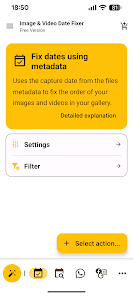
The tool includes a built-in step-by-step wizard to help users scan files, cross-reference metadata, recognize filenames, and perform alignments tailored to specific situations. Besides photos and videos, the software is also compatible with PDF formats and several other file types, while integrating ExifTool to read or write metadata for a wide variety of formats.
Fix dates from metadata and filenames
One of the core mechanisms of Image & Video Date Fixer is extracting recording times located in the EXIF section of photos or QuickTime metadata in videos. When files retain their original data, the system can leverage it to restore accurate modification times.
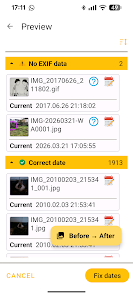
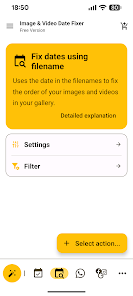
In situations where metadata is lost, the tool can still extract timestamps embedded directly in filenames. All naming formats from cameras, WhatsApp messaging apps, Unix timestamp codes, or custom templates are fully supported. This multi-format processing mode is especially effective when your library is compiled from various sources.
Fix WhatsApp photos and restore library order
For files downloaded from WhatsApp, Image & Video Date Fixer provides specialized features to process batches of photos and videos simultaneously. The platform also allows attaching additional EXIF or QuickTime data so that subsequent transfers do not lose timestamps. Furthermore, you can easily recreate dates from Google Takeout, Meta, or Snapchat data packages as long as the accompanying info files remain intact.
Tips and Guide for Image & Video Date Fixer
Before applying changes to a massive database, you should take advantage of the Before/After preview feature to thoroughly verify upcoming changes. If you only need to process specific folders, use the include or filter exclusion features instead of altering the entire system.
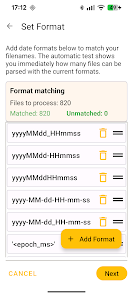
For photos with intact EXIF data, the top priority is extracting timestamps from metadata as this is the most accurate source for capture time. For downloaded files or chat app media that have lost original info, use the filename analysis method. In case of time zone discrepancies, the UTC converter is the optimal solution to adjust to the correct timezone or GPS location. Additionally, the built-in undo history will help you revert to the initial state if the results are not as expected.

The free version limits the number of files processed per operation, while some advanced features like date order fixing require upgrading to the Premium version. Therefore, you should carefully review the features before processing a massive photo library.
Conclusion
Image & Video Date Fixer is truly a powerful assistant for anyone experiencing frustration with photos and videos having incorrect dates or disordered timelines after switching devices. Thanks to its ability to read EXIF, QuickTime, analyze filenames, process messaging app files, recover from archives, and provide visual previews, managing your gallery becomes simpler than ever. If you are rebuilding your photo collection after changing phones or restoring data, this is definitely a name worth considering to permanently solve time-related issues.







