
ihancer MOD APK 1.0.64 (Premium)
⬇ Download APK (17 MB)| Version | 1.0.64 |
|---|---|
| Size | 17 MB |
| Updated | Oct 1, 2026 |
| Category | Photos & Video |
| Requires | Android 5.0 |
| MOD info | Premium |
| Google Play | com.appsmotor.imageenhancer |
MOD features
- Premium Version.
ihancer is an image quality enhancement tool integrated with machine learning technology, specialized in resolving blurry, grainy, pixelated, or dull photos. The app supports uploading existing images or capturing new ones via the camera, performing optimization with just a single tap. Users can also visually observe the before and after processing interface to evaluate the effectiveness.

Overview of ihancer
The biggest advantage of ihancer lies in its extremely streamlined operation. Instead of manually adjusting a series of complex parameters like contrast or sharpness, you simply select the photo that needs upgrading and leave the rest to the automatic system. The algorithm is specially tuned for portrait photos while still performing well across many other genres.
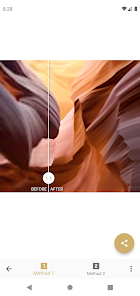
The tool proves useful in various situations such as rescuing blurry photos, fixing pixelation errors, restoring old pictures, upgrading resolution, and highlighting inherent beauty. Once completed, you can easily save to your photo gallery or quickly share to social media platforms, messaging apps, or other graphic software.
Upgrade blurry photos and boost resolution
Through ihancer, users can easily select low-quality frames from their device for the system to automatically sharpen. This utility is extremely powerful for cases of murky photos, low resolution, or pixelation caused by resizing. The machine learning platform will reconstruct and clarify details to deliver a clearer appearance.
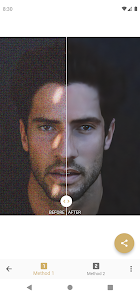
However, increasing resolution does not mean perfectly reconstructing data that is entirely absent in the original. For photos that are too blurry or have severe information loss, the output quality may vary. Therefore, you should carefully compare the old and new versions before applying them to important tasks.
Sharpen portrait photos and compare results
ihancer is optimally designed for frames containing faces, making it ideal for refreshing commemorative photos or shots that did not achieve the desired sharpness. When the process finishes, you can turn on the direct comparison mode to clearly see the difference in detail before and after tuning.

As noted on the app store, the program contains ads and in-app purchase packages. The privacy policy also notes the sharing of certain information with third parties, along with collecting location data and personal information accompanied by encryption mechanisms during transmission. You should carefully consider this point when processing highly private documents.
Tips and operating guide for ihancer
When experiencing ihancer, prioritize starting from the highest quality original photo possible. Avoid using versions that have been compressed multiple times from messaging apps or social networks if the original file is available. Just after processing, remember to zoom in on key areas like eyes, hair, or small features to verify the finesse.
Avoid repeating the enhancement process too many times on the same picture as this easily generates artificial, unrealistic details. For personal documents, papers, or sensitive information, think very carefully before uploading them to the online processing system.
Conclusion
ihancer opens up an optimal and neat solution to rescue blurry, low-resolution, or pixelated photos thanks to modern AI applications. The smart automation mechanism, strong focus on portraits, and direct comparison feature have helped the software score big points with anyone looking for an instant photo sharpening solution.