

How much can I spend MOD APK 3.4.0 (Unlocked)
⬇ Download APK (12 MB)| Version | 3.4.0 |
|---|---|
| Size | 12 MB |
| Updated | Oct 1, 2026 |
| Category | Tools |
| Requires | Android 7.0 |
| MOD info | Unlocked |
| Google Play | pravbeseda.spendcontrol |
MOD features
- Unlocked.
How much can I spend? is a personal finance management app for Android that focuses on a practical question: with the money you currently have available, how much can you spend each day until your next paycheck? Instead of asking users to log and categorize every expense, the app uses your current account balance and payday to determine a daily spending limit.
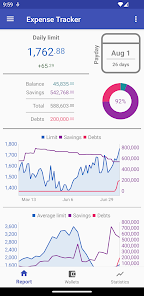
Overview of How much can I spend?
How much can I spend? is developed by Alexander Y. Ivanov and falls under the Finance category on Google Play. It works simply: you enter the amount you currently have, set your next payday, and the app divides that amount by the remaining days to give you a daily spending limit.
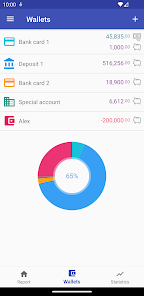
As your balance decreases, the spending limit updates automatically. When a new day begins, the app recalculates based on the remaining amount and the shorter time frame left before payday. This approach helps you easily keep track of your current spending level without managing a complicated budget spreadsheet.
Daily spending limit calculation
The standout feature of How much can I spend? is its ability to turn your current balance into an easy-to-follow spending limit. For example, if you have a certain amount left and only 10 days until payday, the app calculates the average amount you can spend per day. When you update your balance, the new limit adjusts accordingly.
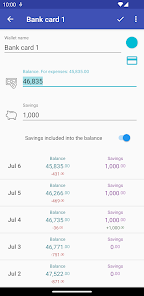
The app also lets you set aside part of your money in a Savings section. That amount is tracked separately and does not affect your daily spending limit. This way, you can save toward a specific goal without throwing off your regular budget.
Simple and private budget tracking
How much can I spend? takes a minimalist approach. The app does not require SMS access to automatically pull transaction information; the data used for calculations is based on the amounts you enter yourself. The app also does not display ads, according to its Google Play description.
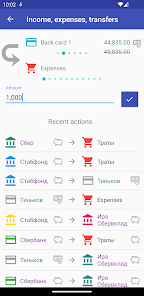
One thing to note is that the app uses a single main currency. If you have multiple currencies, convert them to the main currency before entering them. Google Play currently states that the app may collect location, app performance information, and device or other IDs; data is encrypted in transit.
Tips for using How much can I spend? and guide
When you start using How much can I spend?, enter your actual balance and your nearest payday. Update your balance regularly, especially after large purchases, so the spending limit reflects your current financial situation accurately.
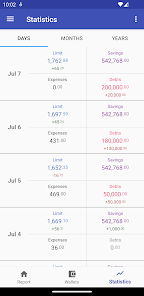
If you have a savings goal, move that money into the Savings section instead of counting your entire balance as spendable. If your spending limit keeps dropping over several days, that may be a sign you are using your budget faster than expected. At that point, review your expenses and adjust your spending accordingly.
Conclusion
How much can I spend? offers a simple approach to managing your finances: focus on the money you have left and calculate how much you can spend each day until payday. With its easy-to-understand usage, Savings tracking feature, and automatic limit adjustments based on your balance, the app is a good fit for anyone who wants to control spending without a complex financial system.







