
| Version | 3.0.1 |
|---|---|
| Size | 12 MB |
| Updated | Oct 1, 2026 |
| Category | Tools |
| Requires | Android 6.0 |
| MOD info | Premium |
| Google Play | dev.km.android.chargemeter |
MOD features
- Premium.
Charge Meter is an app for monitoring battery charging levels on Android devices, focusing on providing detailed information about the charging process and energy consumption. The app can measure current in mA, estimate actual battery capacity in mAh, monitor battery temperature, and estimate time to full charge or battery depletion.
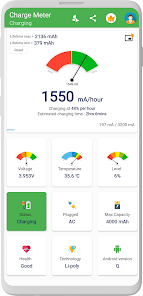
Overview of Charge Meter
With Charge Meter, users can monitor charging speed in real time instead of relying only on battery percentage. Current data measured in mA helps you check charging performance when using different chargers or USB cables.
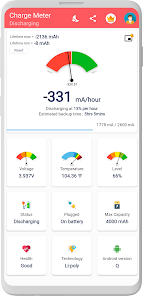
The app also provides information about battery consumption and discharge rate. This is useful data if you want to identify which apps are consuming a lot of power or check battery behavior over different periods.
Check charging current and battery capacity
One of the standout features of Charge Meter is displaying the current when the device is connected to a charger. You can use this metric to compare charging speed across different chargers and cables. The app also supports estimating actual battery capacity in mAh, helping users better understand their device's energy storage capability.
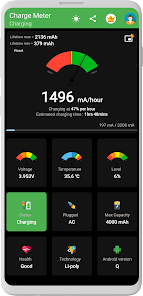
However, charging current is not always stable. It can vary depending on the charger type, cable, phone model, screen brightness, Wi-Fi, GPS, background tasks, and battery condition. When the battery is nearly full, the current may also drop significantly, so you should not rely on a single measurement to judge charger quality.
Monitor temperature and energy consumption
In addition to charging data, Charge Meter also displays battery temperature, discharge rate, and energy consumption by app. This lets you observe battery behavior while gaming, watching videos, using social media, or keeping your phone running for long periods.
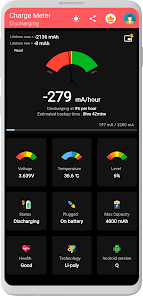
The app can also show the estimated time remaining until the battery is fully charged or the expected usage time before the device runs out of battery. This data should be treated as a reference because actual duration may vary based on usage and running tasks.
Tips for using Charge Meter and instructions
When testing a charger, try to measure under similar conditions for more meaningful comparisons. You can use the same battery level, close some background apps, and keep the screen in a similar state. Then switch chargers or cables one by one to observe the current recorded by the app.
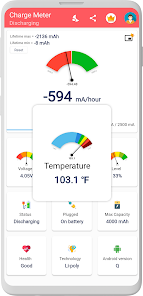
If you want to monitor battery health daily, you should also check temperature and energy consumption instead of focusing only on charging current. The Premium version adds Dark Mode, Picture-in-Picture mode, home screen widgets, and removes ads.
Conclusion
Charge Meter is suitable for users who want to learn more about charging speed, battery capacity, temperature, and energy consumption on Android phones. The mA and mAh metrics along with estimated charging and usage times give you more data to check chargers, USB cables, and daily battery usage habits.







