
| Version | 1.328 |
|---|---|
| Size | 92 MB |
| Updated | Oct 1, 2026 |
| Category | Tools |
| Requires | Android 6.0 |
| MOD info | Premium |
| Google Play | com.elm.elm327.obd2.eobd.obd.car.scanner.diagnostics.tool.dashboard.doctor.check.engine.torque.speed.trouble.codes.mary |
MOD features
- Premium version.
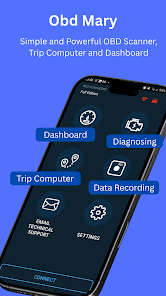
Car Scanner is an Android utility that helps users check and monitor their car's health via the OBD2/EOBD standard. When paired with an ELM327 Bluetooth or Wi-Fi adapter, this software communicates with the car's electronic system to find error codes, monitor live sensor parameters, and present them visually on a customizable interface. In addition, Car Scanner also supports checking several ECUs such as ABS, SRS, Airbag, and HVAC depending on each vehicle model.
Overview of Car Scanner
Car Scanner is built to provide a mobile-based car diagnostic solution, suitable for both drivers who want to check their cars themselves and those deeply interested in technical specifications. The app requires a compatible ELM327 adapter to connect to the 16-pin port on the car via Bluetooth or Wi-Fi.
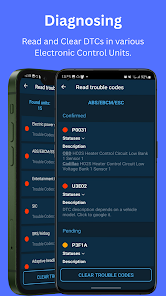
Immediately after successful pairing, the system can read and clear OBD2 trouble codes from compatible controllers. Besides DTC codes, you can also easily review freeze-frame data saved at the time the error occurred, while closely monitoring indicators such as speed, RPM, MAF air flow rate, or coolant temperature.
Retrieving error codes and monitoring vehicle parameters
A standout feature of Car Scanner is its ability to scan error codes currently stored in the ECU. When the Check Engine light turns on, you just need to connect the adapter to perform a scan, look up the DTC code along with detailed descriptions. Other systems like ABS, SRS, Airbag, or HVAC can also be checked if the car and configuration support them.
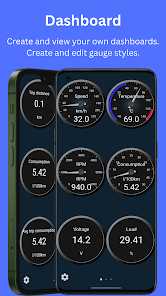
Real-time data helps drivers grasp parameters while the vehicle is in operation. However, the displayed figures will vary depending on the ECU system and sensors of each specific vehicle model; not every car supports all advanced features.
Setting up the dashboard and tracking metrics
Car Scanner integrates a visual gauge system, allowing users to design their own interface with important parameters. You can completely arrange various gauges to observe speed, RPM, temperature, or any data provided by the ECU, turning your phone screen into a convenient dashboard.
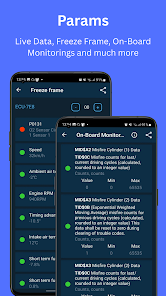
This platform constantly updates with more new OBD2 indices and parameters in advanced versions. However, operational effectiveness still depends on the adapter's quality and the car's compatibility. The development team recommends avoiding low-quality ELM327 types to limit disconnection issues or data inaccuracies.
Tips and user guide for Car Scanner
To get started, plug the ELM327 device into the car's OBD2 port, turn on the ignition, and then connect the adapter to your phone. Next, open Car Scanner, select the correct ELM327 device, and proceed to connect to the ECU. If you encounter issues, recheck the wireless connection, the adapter's power source, as well as compatibility.
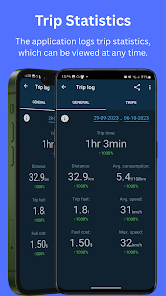
During the error checking process, you should note down the DTC code and freeze-frame parameters before proceeding to clear the error. Clearing the error does not mean the root cause has been thoroughly resolved. If the warning light continues to stay on or the car behaves strangely, view the data from the app as a reference source and take the car to a professional garage.
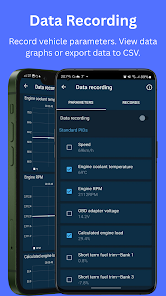
Especially, absolutely do not use your phone or perform diagnostics while driving to ensure safety. Always stop the car completely in a safe place before opening the app. According to Google Play, the software may collect some personal information or location data, and all transmitted data is securely encrypted.
Conclusion
Car Scanner is an effective assistant helping Android users check error codes and monitor car parameters right on their phones. Thanks to its flexible connectivity with ELM327 adapters, DTC code reading, real-time data viewing, and dashboard customization, the app provides a comprehensive overview of vehicle condition. However, these features are supportive and cannot completely replace specialized inspection equipment at service workshops.







