

| Version | 7.1.0 |
|---|---|
| Size | 9 MB |
| Updated | Oct 1, 2026 |
| Category | Tools |
| Requires | Android 8.0 |
| MOD info | Premium |
| Google Play | de.sfr.calctape |
MOD features
- Premium.
CalcTape Calculator is an Android calculator app with a tape-style interface that simulates a roll of paper tape. Instead of just showing the final result, it records all calculation steps line by line, allowing users to easily review, edit, and continue calculations on the same sheet. This approach is especially helpful for complex calculations or when frequent data verification is needed.
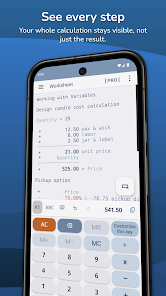
Overview of CalcTape Calculator
The standout feature of CalcTape Calculator is that all numbers and operations are displayed directly on screen. When you modify a value during calculation, subsequent results update automatically. This means users don't have to delete entire calculations just because they entered a number incorrectly.
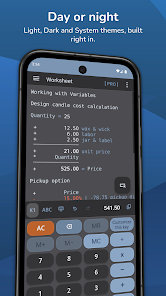
The app supports addition, subtraction, multiplication, division, exponents, and percentages. Users can also add notes next to each value to clarify the purpose of that amount or data point. This makes long calculations more readable and easier to verify compared to regular calculators.
Displaying Calculations and Direct Editing
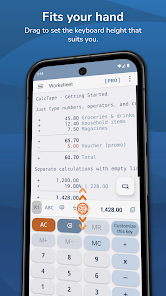
In CalcTape Calculator, each calculation is presented line by line like a notebook. You can enter values consecutively, create partial totals, and track changing results as you input data. If an error is detected in one number, simply select the corresponding line to edit it, and all subsequent results will update automatically.
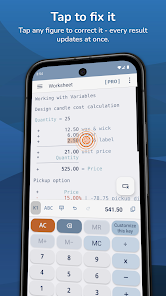
The note feature is also very useful when tracking expenses. For example, you can add notes like rent, food, transportation, or shopping right next to each value. This way, the calculation isn't just a result but retains context for easy review later.
Percentages, Variables, and Keyboard Customization
CalcTape Calculator supports percentage calculations based on the current total, and allows using variables to store and reuse named values. Users can build templates for frequently used calculations and quickly generate new results by changing numbers.
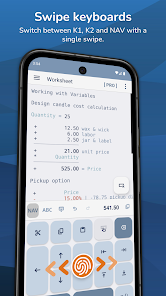
The app also offers multiple keyboard layouts, light/dark modes, and Pro version customization options for keys. The Pro version adds features like saving multiple documents, importing/exporting data, backup, restore, printing, and sharing calculations.
Tips and Guide for Using CalcTape Calculator
When using CalcTape Calculator to manage expenses, enter each item one by one and add notes right after the value. For long calculations, use partial totals to group items like fixed costs, shopping, or incidental expenses.
If you frequently perform the same type of calculation, create a template and use variables instead of re-entering the full formula. It's also wise to verify intermediate lines before using the final result, especially when handling important amounts or data.
Conclusion
CalcTape Calculator provides a more visual calculation experience by preserving the entire process rather than just showing the final result. Its features like direct editing, auto-updating, note-taking, partial totals, and variable usage make it ideal for daily calculations, expense tracking, and computations requiring frequent checks.







