

| Version | 10.4-full |
|---|---|
| Size | 54 MB |
| Updated | Oct 1, 2026 |
| Category | Tools |
| Requires | Android 7.0 |
| MOD info | Premium |
| Google Play | eu.sisik.hackendebug.full |
MOD features
- Premium.
Bugjaeger Premium is a tool application that supports Android users, developers, and anyone who needs to inspect and manage devices directly from their phone. This app functions as a mobile version of ADB and Android Device Monitor, enabling many operations previously only possible on a computer. The connection between devices can be established via USB OTG or Wi-Fi, provided that USB Debugging is enabled and ADB authentication permissions are granted.
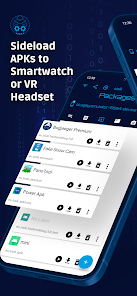
Overview of Bugjaeger Premium
The standout feature of Bugjaeger Premium is its ability to bring multiple Android development and testing tools to mobile devices. The app allows access to an interactive shell, running scripts, viewing system logs, checking hardware and software information, managing apps, and performing file operations on the target device.
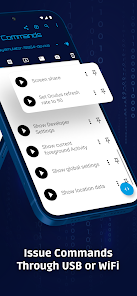
The application supports connections via USB OTG or Wi-Fi. When using USB, the device running Bugjaeger must support USB Host, while the target device needs Developer Options, USB Debugging enabled, and ADB connection permissions. This is Android's standard authentication mechanism, so Bugjaeger Premium does not require root access or bypass security measures.
ADB Tools and Android Device Management
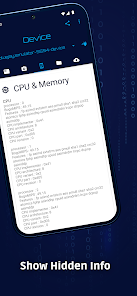
With Bugjaeger Premium, users can perform various actions such as installing or uninstalling apps, launching or force-stopping apps, rebooting the device, entering bootloader mode, rotating the screen, and executing other ADB commands. The app also monitors processes and displays detailed information about CPU, RAM, Android version, ABI, screen, and system properties.
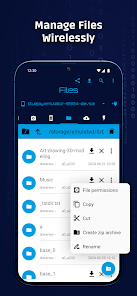
Other useful features include file management between devices. Users can browse the file system, push or pull files, backup and inspect backup contents. The logcat tool supports reading, filtering, and exporting logs, which is very helpful when diagnosing app issues or monitoring system behavior.
Tips and Guide for Using Bugjaeger Premium
Before using Bugjaeger Premium, enable Developer Options and USB Debugging on the target device. Then connect both devices with a USB OTG cable, grant USB access permissions to the app, and confirm the ADB request on the target device. If using Wi-Fi, the Android device needs to be configured for ADB before Bugjaeger can establish a connection.
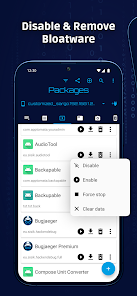
When starting out, it's recommended to check system information or read logcat before executing any change commands. For shell or ADB commands, carefully review the content before running them as a wrong command could cause unexpected errors. Some functions requiring higher privileges may not work if the device is not rooted. The developer confirms that the app uses standard Android communication methods and does not exploit security vulnerabilities.
The Premium version also includes extended features such as unlimited custom commands, unlimited shell commands in interactive sessions, changing ADB port over Wi-Fi, unlimited screen captures, recording screencasts as videos, and modifying file permissions.
Conclusion
Bugjaeger Premium is a deep Android toolkit designed for users who need to inspect, debug, and manage devices without relying entirely on a computer. From ADB shell, logcat, app management, file handling, process monitoring to hardware and system information, the app provides numerous tools within a mobile interface. It's an ideal choice for developers, advanced Android users, and anyone frequently working with ADB or directly inspecting devices.







