

| Version | 1.95.104 |
|---|---|
| Size | 253 MB |
| Updated | Oct 1, 2026 |
| Category | Tools |
| Requires | Android 10 |
| MOD info | Premium |
| Google Play | com.brave.browser |
MOD features
- Premium version.
Brave is a web browser app for Android, standing out with superior speed, high security, and a built-in ad blocker. The app features Brave Shields technology to completely eliminate ads, trackers, and malicious cookies without needing to install any extra extensions.
Overview of Brave
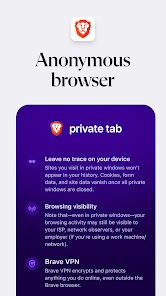
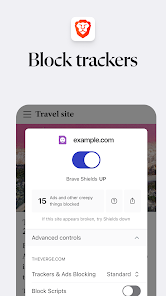
The biggest plus of Brave is its privacy protection mechanism, which is activated automatically. Brave Shields not only disables ads and trackers but also fights device fingerprinting and cross-site tracking techniques. Users can easily and flexibly customize the security level for each specific website if any display errors occur.

Alongside the browser, Brave also comes with Brave Search - a search engine committed to not storing user profiles. Combined with incognito mode, pop-up and script blocking, and bookmark management, the app fully meets all daily web browsing needs.
Brave Shields and the Web Browsing Experience
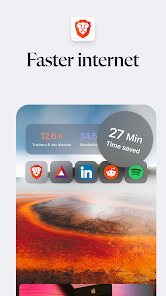
Brave Shields directly intervenes in websites and provides detailed statistics on blocked elements, helping you understand the ad density of each page. Users can easily reconfigure the Shields settings for individual pages instead of turning them off completely.
In addition, the browser integrates many useful entertainment and reading utilities such as dark mode, Speedreader, and Playlist. The Playlist feature allows storing videos and audio for offline playback, supports background play, and offers controls right on the lock screen.
Brave Leo – Built-in AI Assistant
Another notable improvement on Brave is the appearance of Brave Leo, a smart AI assistant integrated right into the interface. Leo has the ability to answer questions, analyze documents, summarize web pages, translate, and assist with text composition directly on Android without switching apps.
Recent updates also bring the ability to attach PDF files to Leo, allowing you to choose AI models and quickly access it via shortcuts. This feature is extremely useful for those who regularly research documents or need high-speed information processing.
Tips and User Guide for Brave
Right upon installing Brave, you should explore the Shields section to understand the default security mechanism. If a website encounters issues, try lowering the blocking level for that specific page rather than disabling it entirely.
You can also sync or import data from your old browser to Brave to continue using it seamlessly. Don't forget to experience the Leo assistant to quickly summarize content or use the Playlist to listen to music and podcasts while doing other work.
Conclusion
Brave is the perfect blend of the Chromium engine, powerful ad blocking, maximum security, independent search, and the Leo AI assistant all in one platform. For anyone who wants a clean web browsing experience without being bothered by trackers, this is definitely an unmissable choice on Android.







