
AmpereFlow: Battery Charging MOD APK 2.1.8 (Premium)
⬇ Download APK (15 MB)| Version | 2.1.8 |
|---|---|
| Size | 15 MB |
| Updated | Oct 1, 2026 |
| Category | Tools |
| Requires | Android 7.0 + |
| MOD info | Premium |
| Google Play | com.androxus.batterymeter |
MOD features
- Premium.
AmpereFlow is an app that helps track the battery charging process on Android, providing metrics such as current, charging power, temperature, voltage, and the estimated time for the battery to reach 80% or 100%. The app also supports fast charging detection, battery health monitoring, and recording charging history.
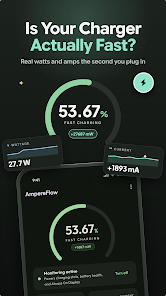
Track charging speed with AmpereFlow
Instead of just looking at the fast charging icon in the status bar, AmpereFlow lets users view the metrics related to the battery charging process directly. When the phone is plugged in to charge, the app can display the current in milliamperes and the estimated charging power in watts in real time.
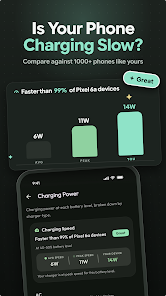
This data is very useful when you want to compare the differences between chargers, cables, power banks, or USB ports. However, the accuracy of the metrics also depends on how each Android device provides sensor data, so results may vary between phone models.
Check power and charging status
With AmpereFlow, users can monitor charging power, current, voltage, and temperature while plugged in. The app also displays the charging status reported by the device, helping you know whether fast charging mode is active.
Another notable feature is the estimated time for the battery to reach 80% or 100%. This information helps you estimate when you can unplug instead of constantly checking the battery percentage. The app also provides charts to track changes in metrics during each charging session.
Monitor battery health and charging history
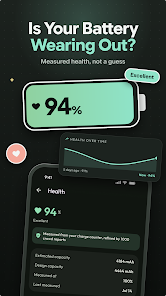
Besides measuring charging speed, AmpereFlow also provides estimates of battery health and capacity. Users can track battery health trends through historical charts instead of relying on a single measurement. Charging session history also helps compare charging behavior across different usage instances.
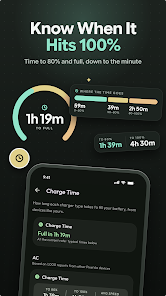
The app also supports widgets that display information such as power or temperature right on the home screen. An always-on charging display mode is also designed to show charging information on the screen, especially suitable for devices with AMOLED displays.
Tips for using AmpereFlow and guide
When using AmpereFlow to test a charger, try the same phone with different cables or chargers under similar conditions. Recording the power and charging speed helps you easily identify which device performs more consistently.
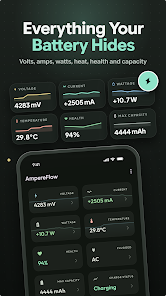
If you want to monitor battery health over the long term, use the app regularly and observe trends over time instead of drawing conclusions from a single measurement. If the phone or battery gets unusually hot while charging, check the charger, cable, surrounding environment, and device condition. Also, as noted by the app store, battery data and sensor accuracy may vary by device.
Conclusion
AmpereFlow focuses on turning charging metrics that are otherwise hard to observe into visual data on your Android phone. From power, current, and temperature to charging history and battery health estimates, the app offers many tools to help users better understand the energy charging process. It's a suitable choice for those who frequently check charging speed or want to monitor battery condition over time.







