

Alcogram: Cai Rượu, Tỉnh Táo MOD APK 5.0 (Premium)
⬇ Download APK (39 MB)| Version | 5.0 |
|---|---|
| Size | 39 MB |
| Updated | Oct 1, 2026 |
| Category | Tools |
| Requires | Android 6.0 |
| MOD info | Premium |
| Google Play | com.kursx.booze |
MOD features
- Premium.
Alcogram is an app that helps track alcohol consumption on Android devices, featuring a drinking log, a sober day counter, and habit analysis tools. Users can save the drinks they've consumed, track consumption, costs, and calories, while also recording streaks of alcohol-free days.
Overview of Alcogram
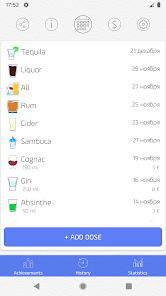
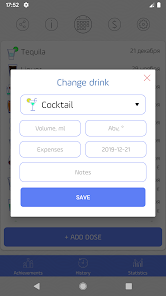
Alcogram is designed for people who want to better understand their drinking habits or are working toward reducing their alcohol intake. Instead of keeping manual notes, users simply enter information directly into the app and review data day by day. Each entry lets you choose the drink type, volume, and add notes.
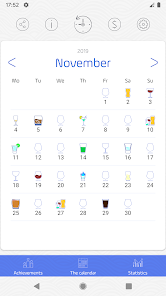
The app also provides a calendar for tracking drinking and non-drinking days, making it easy to look back at habits over a given period. In addition to tracking alcohol, Alcogram also tallies the costs and calories associated with drinks, offering a more comprehensive view of your lifestyle.
Logging drinks and tracking alcohol-free days
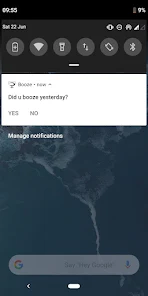
The core function of Alcogram is keeping a daily drink log. The app prompts users to check whether they drank the day before, then select the drink type and corresponding volume. Easy data entry makes maintaining the log more convenient.
Beyond drinking history, the app also tracks streaks of alcohol-free days. Users can set goals and watch their number of days without alcohol increase over time. Alcogram also supports milestones such as 7, 30, and 100 days to mark progress toward maintaining goals.
Habit statistics and Android features
Alcogram provides metrics related to consumption, calories, and money spent on drinks. These statistics give users concrete data to review their habits instead of relying only on feelings. The app also supports home screen widgets to display alcohol-free days or perform quick logging actions.
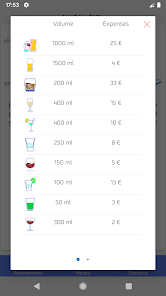
Additionally, the current version supports data export, volume unit selection, and some content-sharing features. Google Play states that the app may collect location, personal information, and some other types of data; data is encrypted in transit and users can request data deletion.
Tips for using Alcogram and guide
When starting with Alcogram, log your drinks as accurately as possible, especially the type and volume. Keeping the log consistently will help the data better reflect your actual habits over time. You can enable daily reminders to avoid missing entries.
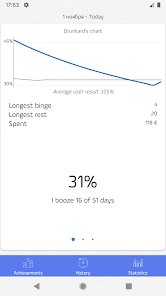
If your goal is to cut back on drinking, use the calendar and alcohol-free day counter to track your progress week by week. Cost and calorie figures can also serve as reference information when evaluating your lifestyle habits. However, Alcogram is only a tracking tool and does not replace medical advice or treatment for alcohol-related issues.
Conclusion
Alcogram offers a simple way to record your alcohol intake, track alcohol-free days, and observe how your habits change over time. With a drink log, calendar, cost and calorie statistics, an alcohol-free day counter, and an Android widget, the app can help users proactively monitor their goals. It's a habit management tool suited for anyone who wants clearer data about their alcohol consumption.







