

| Version | 1.7.6 |
|---|---|
| Size | 15 MB |
| Updated | Oct 1, 2026 |
| Category | Tools |
| Requires | Android 7.0 |
| MOD info | Premium |
| Google Play | ccc71.am |
MOD features
- Premium.
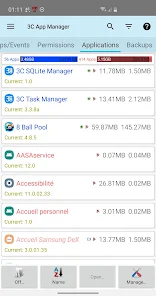
3C App Manager is an Android app management software that helps users comprehensively control their app library and backup data on their device. In addition to backup and restore functions, this tool also supports sorting apps by various criteria, managing backups, checking permissions, and monitoring events that can launch apps.
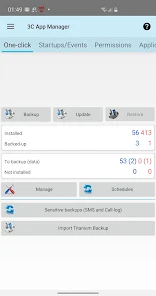
Manage Android apps with 3C App Manager
Instead of just displaying a list of installed apps, 3C App Manager offers many features that help users organize and manage apps in detail. You can sort apps by name, app size, data size, backup size, install date, or path.
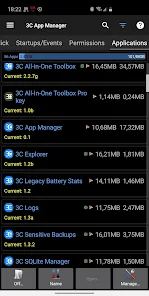
The app also supports tagging to categorize apps and backups. This organization method is suitable for users who have many apps on their phone and want to quickly find a specific group of apps instead of scrolling through a long list.
Back up and restore apps
One of the standout features of 3C App Manager is app backup and restore. Backups can be stored locally or use supported services such as Samba, FTP/S, WebDAV, Google Drive, and Dropbox. Users can also set up backup schedules by day, week, month, or by created tag.
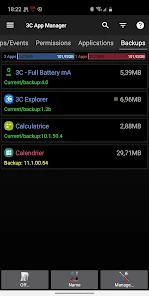
The app also supports importing backups from Titanium Backup and creating TWRP backups. However, some advanced features related to app data require root or the use of 3C Companion. Therefore, actual usability will depend on the Android version and device status.
Check permissions and manage app activity
Besides backup, 3C App Manager lets you view the permissions an app is using as well as the events that can launch an app. This is useful information when you want to learn more about how installed apps operate on your phone.
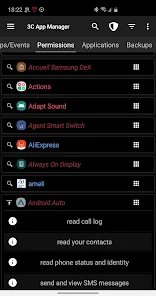
On rooted devices or when combined with 3C Companion, the app also expands some capabilities such as adjusting event status, controlling full-screen mode, keeping the screen on, rotating the screen, or protecting app access with a PIN, pattern, or fingerprint. Some other features require root or the Xposed Framework.
Tips and guide for using 3C App Manager
When getting started with 3C App Manager, you should create a separate group or tag for important apps and then perform regular backups. For important backups, you should also save a copy in another location instead of keeping it only on your phone's storage.
If you are not using a rooted device, pay attention to the requirements of each feature. You should not root your phone just to use one function if you do not fully understand the related risks. With the Accessibility permission used for some automation features, users should also check the permission and data policy before granting access to the app. According to information on Google Play, the app was updated on 08/17/2026 and declares that data is encrypted in transit.
Conclusion
3C App Manager targets users who want to manage Android apps more deeply than with default tools. From backup, restore, and app categorization to checking permissions and launch events, the app provides many options in a centralized management interface. In particular, users with rooted devices or those using 3C Companion can access additional advanced features.







