| Versão | 1.2.0 |
|---|---|
| Tamanho | 217 MB |
| Atualizado | 1 de out. de 2026 |
| Categoria | Ferramentas |
| Requer | Android 8.0 |
| Info do MOD | Premium |
| Google Play | com.cosmomime.komxreader |
Recursos do MOD
- Premium.
Komx is an Android-based comic and manga reading application, notable for its ability to handle local files along with integrated AI tools directly on the device. The app supports common formats such as ZIP, CBZ, as well as image folders containing JPEG, PNG, or WEBP files. Beyond reading functionality, Komx also allows users to colorize black-and-white manga using artificial intelligence, recognize text, and translate content directly within the comic pages.

Experience reading comics and manga directly on your Android device
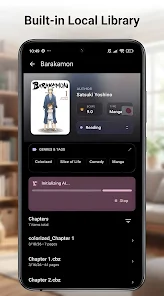
One of the standout features of Komx is its built-in library management system that stores your comics locally on the phone. Users can open ZIP, CBZ files, or image directories directly without needing to convert them into other formats. This feature is ideal for those who already have a manga collection on their device and want a professional reading experience.

The app also includes a library management system with features like custom categories, global tags, and Folder Merge functionality. This allows users to easily organize comics stored in multiple folders for easier searching and continued reading.
Colorize black-and-white manga using artificial intelligence directly on your device
One of the standout features of Komx is its AI Colorization capability. The app uses ONNX and TensorFlow models to automatically colorize black-and-white comic pages. According to the developers, this process runs entirely on the device rather than being sent to a server for processing.

This local processing method suits users concerned about privacy or who prefer not to upload images to online services. However, AI coloring may require significant hardware resources, especially when processing multiple pages at once, so actual performance will depend on your Android device's capabilities.
Integrated OCR, translation, and Web Reader
In addition to reading and coloring features, Komx integrates Google ML Kit-based OCR technology to recognize text within comics. After recognition, users can utilize the built-in translation tool to understand content from manga or comics in other languages. This feature is particularly useful when reading imported comics that lack pre-translated versions.
Komx provides a Web Reader feature that allows users to browse online comic pages through an integrated reader. By combining local library and browser functionality, you can easily manage saved content while accessing online comic sources without switching between multiple apps.
Tips for using and guide to Komx
When starting with Komx, first grant storage access through Android's Storage Access Framework, then select the folder containing manga or comics. If your library is already compressed in CBZ or ZIP format, you can open it directly to start reading. With many different series, creating categories or using tags will help manage your library more easily and effectively.
If you want to experience the AI Colorization feature, start with a few black-and-white manga pages instead of processing entire series at once. After reviewing the results, you can adjust usage according to device performance. Features like OCR and translation should only be used when truly needed to avoid consuming additional resources during reading.
Conclusion
Komx is not just a regular manga reader app; it also integrates library management, Web Reader, text OCR, translation, and AI colorization for black-and-white manga. Support for ZIP, CBZ formats along with image folders makes the app flexible and suitable for users who store comics directly on their Android devices.
If you're looking for a tool that both reads manga and processes content using AI right on your phone, Komx is a worthwhile consideration. Particularly, its focus on local processing helps make reading and managing your collection more autonomous and convenient.