

X8 Speeder MOD APK 3.3.6.7-gp (No Ads)
⬇ Scarica APK (13 MB)| Versione | 3.3.6.7-gp |
|---|---|
| Dimensione | 13 MB |
| Aggiornato | 3 ott 2026 |
| Categoria | Strumenti |
| Richiede | Android 4.1 + |
| Info MOD | No Ads |
X8 Speeder is an application developed in China that allows you to easily speed up any game with just a few simple steps. In this article, ApkUnlimit will guide you on how to use this app effectively.
Guide to Easily Speed Up Games with X8 Speeder
Currently, there are many tools available to help users change game speeds, but these methods are often complicated, requiring many steps or rooted devices. With X8 Speeder, all barriers are removed thanks to a mechanism that directly modifies the APK file, allowing you to add a speed adjustment menu without needing root access.
X8 Speeder can speed up all games, including online titles like Dai Hiep Piu Piu Piu, Coin Master, Weapon Heroes, or Archero...
Guide to Installing and Using X8 Speeder
- Step 1: Download the APK file from below and install it as usual.
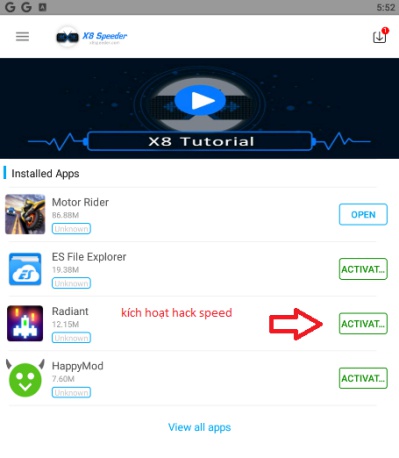
- Step 2: Open the app, and you will see a list of installed games. Select the game you want to speed up.
- Step 3: Select ACTIVATED and wait for the uninstall prompt, then press OK.
- Step 4: After uninstalling, the app will automatically reinstall the game. Please open the game once it's finished.
- Step 5: When you open the game, you will see a circular icon. Tap on it to adjust the speed.
Notes When Using
- For some online games, make sure you remember your account details so you don't lose data when reinstalling.
- In case the game requires OBB data, you need to download it again and save it to the Android/obb folder.
- Do not abuse this feature with online games, as it may lead to account bans.
How to Disable Ads on X8 Speeder
- Method 1: Go to the internet access management section in your settings, find X8, and disable its network permissions.
- Method 2: Install NetGuard and disable all network access for X8. This way, ads will not be displayed.







