Test Paper Generator MOD APK 2026.09.10 (Premium)
⬇ APK डाउनलोड करें (49 MB)| संस्करण | 2026.09.10 |
|---|---|
| आकार | 49 MB |
| अपडेट | 1 अक्टू॰ 2026 |
| श्रेणी | शिक्षा |
| आवश्यक | Android 7.0 |
| MOD जानकारी | Premium |
| Google Play | com.educationalappspk.testpapergenerator |
MOD फ़ीचर
- Premium Version
Test Paper Generator is a tool that helps teachers easily create test papers from an available question bank. Instead of having to write each question and format the entire test from scratch, users simply select questions by their desired subject, chapter, or topic to automatically generate a complete test. The app supports multiple question types such as multiple-choice, short-answer, and essay questions, while allowing results to be saved as PDF files for printing or sharing.
Overview of Test Paper Generator
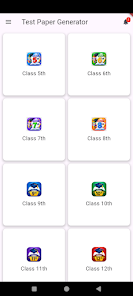
Test Paper Generator is designed to simplify the test creation process on mobile devices. The app caters to teachers who frequently need to prepare classroom tests, making it particularly suitable for high school curriculum subjects. Users can pull questions from a content repository instead of re-entering all the content for every single test.
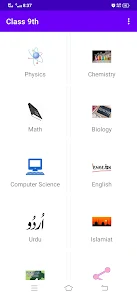
The current content focuses on subjects like English, Urdu, Islamic Education, Physics, Chemistry, Mathematics, and Computer Science. The app supports creating tests for students from grade 9 to grade 12, with the current version now adding content for grades 5 through 8 while retaining the legacy grade 9 curriculum.
Create Tests from the Question Bank
One of the standout features of Test Paper Generator is that it allows users to filter and select questions according to their needs. Teachers can choose the subject, chapter, or knowledge section to test, and then select appropriate questions to build the exam. The three main question formats include multiple-choice, short-answer, and open-ended questions, allowing the test to feature diverse assessment styles.
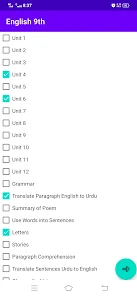
This approach is especially useful when teachers need to create multiple tests in a short amount of time. Instead of spending time formatting documents, users can focus on selecting content that fits their lectures. The app also supports quickly generating quizzes and multiple-choice tests.
Save as PDF and Share for Printing
Once question selection is complete, Test Paper Generator allows you to save the test paper as a PDF file. This file can be used to print physical test papers or shared with others. This feature is ideal for teachers who want to prepare tests directly on their phones while still needing a complete, ready-to-use document for the classroom.
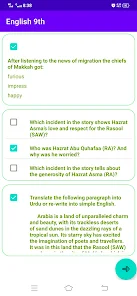
Test Paper Generator helps teachers easily build tests from an existing question bank. However, to ensure accuracy, users should review the content before use, as the developer also recommends sending feedback if they encounter any errors in the questions.
Tips and Tricks for Using Test Paper Generator
First, when working with Test Paper Generator, you need to select the corresponding grade and subject. Then, choose the chapter or section of knowledge to test, and review the question list before adding them to the test. Careful checking helps avoid questions that are irrelevant to the teaching content or duplicates.
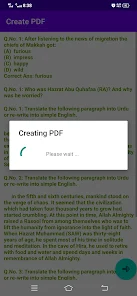
In a classroom test, it is recommended to combine various question formats instead of using only MCQs. Multiple-choice questions are useful for quickly assessing knowledge, while short and long-answer questions are better suited for testing students' ability to explain or present.
Once finished, you should export the test as a PDF and review the layout before printing. If sharing the test as a file, name it clearly by grade, subject, and chapter for easy management. According to Google Play information, this app does not share data with third parties and does not collect information as declared by the developer.
Conclusion
Test Paper Generator is a helpful tool for teachers to quickly create tests from a question bank. Supporting MCQs, short-answer questions, long-answer questions, chapter-based selection, and PDF export makes the test preparation process much easier. The app is especially useful if you frequently need to create tests for multiple classes or subjects, saving time in selecting and organizing questions.