
OMR Master: Offline OMR Sheet MOD APK 3.5.1.0 (Premium)
⬇ APK डाउनलोड करें (22 MB)| संस्करण | 3.5.1.0 |
|---|---|
| आकार | 22 MB |
| अपडेट | 1 अक्टू॰ 2026 |
| श्रेणी | शिक्षा |
| आवश्यक | Android 7.0 |
| MOD जानकारी | Premium |
| Google Play | in.rankguard.mcqmarker |
MOD फ़ीचर
- Premium.
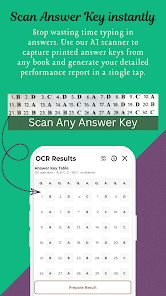
OMR Master is an app designed to help users practice multiple-choice exams by turning their phone into a digital OMR sheet. Instead of printing paper answer sheets every time they take a test, users can create tests directly within the app, configure the number of questions, answer options, time limits, and grading methods. Once completed, results can be checked by manual entry or by scanning answers from books using the camera.
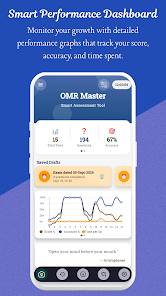
Overview of OMR Master
The highlight of OMR Master is that it does not replace the test sources, but rather focuses on supporting test-taking and result analysis. Users can get questions from books, practice sets, or existing materials, and then use OMR Master as an electronic answer sheet. The app works offline for creating tests, taking exams, and viewing results, while the camera answer scanning feature requires an internet connection.
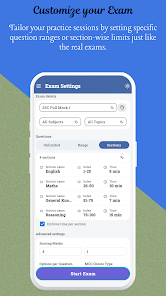
Create OMR Tests and Simulate Exams
When starting a test, OMR Master allows users to set up the number of questions, number of answer choices (4 or 5 options), exam duration, and scores for correct/incorrect answers. Supporting negative marking helps users configure grading schemes closely aligned with the standards of many real-world multiple-choice exams. The app is also equipped with a countdown timer and records the total test-taking time.
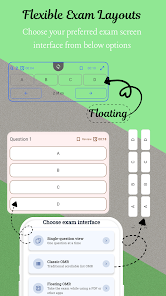
During the test, users can choose List View to see all questions on a single screen or Sliding View to focus on one question at a time. The sliding mode also tracks the time spent on each question, helping learners identify difficult sections. Questions that need review can also be flagged for later handling.
Answer Scanning and Result Analysis
One of the most useful features of OMR Master is its ability to use the camera to scan answers from books. According to Google Play data, the app can recognize answer formats like A/B/C/D or 1/2/3/4 and convert them into the appropriate format for the test. Users can also enter answers manually if they prefer not to use the scanning feature.
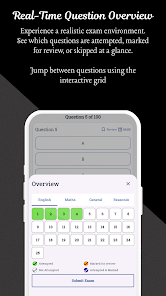
After completing the test, users will not only see their scores but also receive a detailed breakdown of each question: correct, incorrect, or skipped. The app also displays the average time per question, helping identify time-consuming questions and track performance trends via charts. Practice history is organized by subject, topic, or tag for easy reference. Results can be exported as a PDF file and shared directly.
Tips and Guide for OMR Master
To get the most out of OMR Master, you should configure the number of questions and test duration to match the actual exam. If the exam includes penalty points, enter the exact scores for correct and incorrect answers so the results accurately reflect the grading system. This helps you develop the habit of weighing whether to answer or skip uncertain questions.
During the test, use the bookmark feature to flag questions for review rather than spending too much time on a difficult one. Afterward, check the time analysis section to identify questions that slowed you down. If a topic frequently appears in the incorrect answers group, make a note to review it separately.
Conclusion
OMR Master is the ideal application for those who frequently practice multiple-choice tests but want to limit the use of paper OMR sheets. From creating tests, setting negative scores and time limits, taking tests with multiple display modes, to scanning answers and analyzing time per question, the entire practice process is fully supported. The offline capability and PDF export feature make storing and reviewing easier than ever. For students or anyone preparing for multiple-choice exams, OMR Master is an effective supplementary tool alongside textbooks and practice sets.