
| نسخه | 2.8 |
|---|---|
| حجم | 15 MB |
| بهروزرسانی | ۹ مهر ۱۴۰۵ |
| دستهبندی | موسیقی و صدا |
| نیازمندی | Android 8.0 |
| اطلاعات MOD | Premium |
| Google Play | com.panda.musicplayerpro |
ویژگیهای MOD
- Premium.
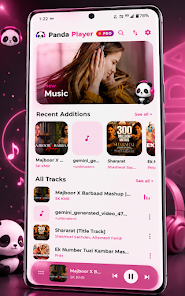
Panda Music Player is an offline music player app for Android that focuses on managing and playing audio files stored directly on your device. The app supports a wide variety of formats including MP3, FLAC, WAV, AAC, M4A, and OGG, while integrating an Equalizer, real-time lyrics display, background playback mode, and numerous interface customization options. According to Google Play information, the app requires no login or account and doesn't need an online music streaming service.
What are the advantages of Panda Music Player?
The standout feature of Panda Music Player is its ability to fully leverage your personal music library on your device. Users can organize, search, and play music instantly without requiring an internet connection. This is ideal for those who love their personal music collection and want to avoid relying on streaming platforms.
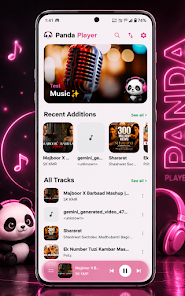
The app allows music playback with the screen off, supports gapless playback without pauses between tracks, and smooth transitions between songs through Crossfade. Users can also adjust playback speed, balance volume levels, and set an automatic sleep timer to stop playback after a specified time.
Equalizer, audio processing, and lyrics
With Panda Music Player, users can use the built-in Equalizer with preset sound modes or customize individual frequency bands to achieve sound quality that suits their preferences. The app also provides sound effects to adjust bass and meet personalized audio needs according to your preferences or listening device.
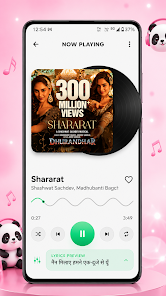
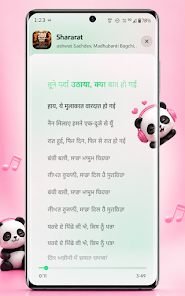
The synchronized lyrics feature is a notable advantage. Song lyrics display line by line on the playback interface, making it easier for users to follow along. However, the lyrics display capability depends on content sources that the app can provide or recognize for each track.
Interface customization and music library management
Panda Music Player allows users to switch between light, dark, and system theme modes. There are many accent color options, the ability to customize colors or choose wallpapers from the library. The app also supports pure black AMOLED mode and allows you to change the app icon using panda-themed designs.
In the library management section, users can quickly search for songs, use the mini player, and control playback from notifications or the lock screen. The app also supports hiding files, managing deleted files, and allows you to set ringtones directly from the currently playing track.
Tips and guide for using Panda Music Player
When you start using it, organize your music library by folder or clear track information to improve search efficiency. For albums with continuous track sequences, enable gapless mode to avoid gaps between tracks.
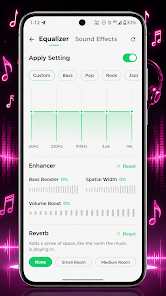
If you frequently listen to music before sleep, use the Sleep Timer instead of letting it play continuously. When listening through headphones, you can try the Equalizer with moderate adjustments, then fine-tune gradually according to your preferences to avoid audio distortion.
Conclusion
Panda Music Player is an ideal choice for users who want a lightweight yet feature-rich Android music player. From multi-format support, background playback, gapless mode, Crossfade, Equalizer, synchronized lyrics to Sleep Timer, the app meets diverse offline music listening needs. If you regularly store music directly on your phone and want control over playback and interface, Panda Music Player is definitely worth considering.