

| نسخه | 10.4-full |
|---|---|
| حجم | 54 MB |
| بهروزرسانی | ۹ مهر ۱۴۰۵ |
| دستهبندی | ابزارها |
| نیازمندی | Android 7.0 |
| اطلاعات MOD | Premium |
| Google Play | eu.sisik.hackendebug.full |
ویژگیهای MOD
- Premium
Bugjaeger Premium is a utility application for advanced Android users, developers, and anyone who wants to inspect and control devices through their phone. The app functions similarly to ADB tools and Android Device Monitor but without requiring a computer—instead, users can perform many operations directly on their Android device. Connection between two devices can be established via USB OTG or Wi-Fi after enabling USB Debugging mode and granting ADB authentication permissions.
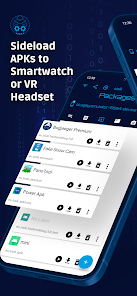
Overview of Bugjaeger Premium
Bugjaeger Premium stands out by integrating many popular tools used in Android development and testing workflows onto a mobile device. The app provides interactive shell access, script execution, system log reading, hardware and software information inspection, app management, and file operations on the target device.
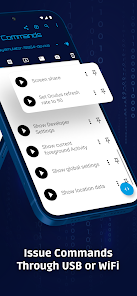
The application supports connection via USB OTG or Wi-Fi. When using USB, the device running Bugjaeger must support USB Host, while the target device must have Developer Options enabled, USB Debugging turned on, and ADB connection allowed. This is Android's default authentication mechanism, so Bugjaeger Premium is not a rooting tool and cannot bypass the operating system's security measures.
ADB Software and Android Device Management
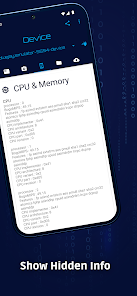
With Bugjaeger Premium, users can perform many administrative tasks such as installing/uninstalling apps, starting/stopping packages, rebooting devices, switching to bootloader, rotating the screen, or executing other ADB commands. The app also supports process monitoring and provides information about CPU, memory, Android version, ABI, display, and system properties.
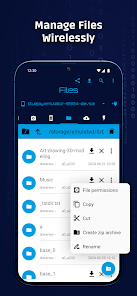
File management between devices is a standout feature. Users can browse the file system, push/pull files, perform backups, and verify backup contents. The logcat tool helps read, filter, and export logs, which is useful when troubleshooting app errors or analyzing system behavior.
Tips and Guide for Using Bugjaeger Premium
Before using Bugjaeger Premium, enable Developer Options and USB Debugging on the target device. Connect the two devices via USB OTG cable, grant USB access permissions to the app, and accept the ADB authentication request on the target device. If you want to use Wi-Fi, the Android device needs proper ADB configuration before Bugjaeger establishes the connection.
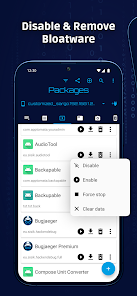
When starting out, begin by checking system information or reading logcat before executing commands that modify apps and system settings. With shell or ADB commands, carefully review the content before executing since an incorrect command may cause unintended changes. Features requiring elevated permissions may not work on non-rooted devices. The developer confirms the app only uses standard Android communication methods and does not exploit vulnerabilities to bypass security mechanisms.
The Premium version also provides extended features such as unlimited custom commands, unlimited shell commands in each interactive session, changing ADB connection port over Wi-Fi, unlimited screenshots limited only by storage capacity, screencast recording as video, and file permission modification.
Conclusion
Bugjaeger Premium is a comprehensive Android toolkit for those who need to inspect, debug, and manage devices without relying entirely on a computer. From ADB shell, logcat, app management, file operations, process monitoring, to hardware and system information, the app provides many tools in a mobile interface. It's an ideal choice for developers, advanced Android users, and those who frequently work with ADB or perform direct device inspection.







