OMO Roll: Film Cam & CCD Retro APK 5.0.18
⬇ Descargar APK (37 MB)| Versión | 5.0.18 |
|---|---|
| Tamaño | 37 MB |
| Actualizado | 1 oct 2026 |
| Categoría | Imágenes y Videos |
| Requiere | Android 7.0 |
| Google Play | com.camerafilm.lofiretro |
Funciones del MOD
- Premium
OMO Roll is a photography app designed exclusively for Android devices, featuring a classic film and digital CCD camera style. The app helps users create photos with a nostalgic feel, complete with film grain, light leaks, lo-fi effects, and date stamps reminiscent of old-school compact cameras. Users can shoot directly using the camera or select photos from their gallery to apply retro effects.
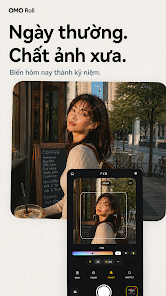
Shoot film and CCD photos right on your phone
The highlight of OMO Roll is its ability to apply effects while shooting, rather than having to edit after saving the photo. Presets like FXNR, CPM35, and CCD recreate the characteristics of 35mm film or early 2000s digital cameras, delivering distinct colors and contrast compared to the default phone camera.
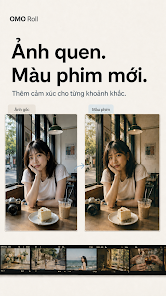
The app also focuses on the Y2K aesthetic and everyday snapshots. The remaining presets offer various processing options such as warm film tones, disposable camera looks, Polaroid effects, digicam colors, or lo-fi aesthetics with dark vignettes. As a result, users can easily choose the right effect for each situation instead of using a single filter for every photo.
Retro presets, flash, and classic date stamps
OMO Roll offers a variety of camera and film styles, including Riko Pop with Y2K star frames, FXNR for everyday photography, CPM35 inspired by early 2000s CCDs, FN 1600 suitable for low-light environments, and effects like Holga, Polaroid, or camcorder. Some presets even combine frames, stickers, or signature colors to create the feel of shooting with vintage gear.
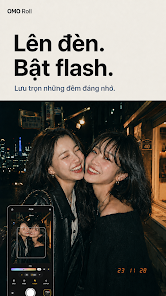
Flash effects are an essential part of the app's style, especially when shooting in cafes, on the streets, or during nighttime gatherings. Users can also add date stamps in LED or VCR display styles to evoke the look of old compact cameras and digicams.
Import photos, adjust effects, and create collages
In addition to live shooting, OMO Roll allows users to import photos from their gallery to apply film and CCD effects. Filter intensity, grain, light leaks, and vignettes can be adjusted using sliders, giving users control over the retro intensity rather than just relying on default presets.
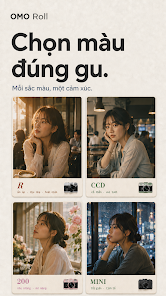
OMO Roll has just been updated with a diverse photo selection feature and vintage-style collage creation, along with a trash folder to manage and recover deleted images. The interface has also been optimized for standard phones, foldables, and tablets.
Tips and Guide for OMO Roll
When you start using OMO Roll, you should experiment with various scenes using different presets to find the right color tone. For night shots or photos taken in cafes, try high-contrast flash styles and presets. Meanwhile, FXNR or subtle film tones are better suited for street photography, travel, and everyday moments.
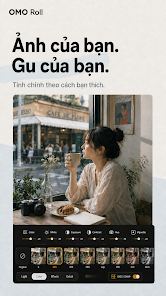
If you want your photos to feel like a real roll of film, avoid over-editing parameters after capturing. The enhancement of grain and light leaks should be kept moderate to ensure the main subject remains clear. Date stamps should also be used intentionally, especially when you want to recreate a 2000s family photo or digicam aesthetic.
Conclusion
OMO Roll is a great fit for anyone who loves film, CCD, and Y2K photography styles without wanting to carry a separate compact camera or digicam. The app supports direct shooting, photo importing, film presets, flash, grain, light leaks, vignettes, date stamps, and collages, helping you create various retro styles right on Android. If you love natural-looking, slightly "vintage" photos with the color vibes of 2000s cameras, OMO Roll is definitely worth a try.