| Versión | 4.4.0 |
|---|---|
| Tamaño | 16 MB |
| Actualizado | 1 oct 2026 |
| Categoría | Personalización |
| Requiere | Android 8.0 |
| Info del MOD | Premium |
| Google Play | io.github.sds100.keymapper |
Funciones del MOD
- Premium
Key Mapper is a specialized software for Android devices that allows users to customize the functions of physical keys, including buttons on game controllers, keyboards, and other input devices. Instead of relying solely on the default system key functions, you can create personalized rules that transform volume buttons, side buttons, or keyboard keys into different actions. The app also supports creating virtual keys on the screen and building macros to perform multiple tasks continuously.
Customize Keys and Input Devices
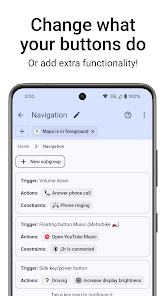
The standout feature of Key Mapper is its ability to reconfigure functions for various types of keys. The application supports physical buttons on phones, keyboard keys, mouse buttons, game controllers, headphones, and fingerprint sensors. For gaming controllers, users can configure buttons such as D-pad or ABXY; however, some joystick and trigger types still have limited support.
Not only can you change the function of a single key, but users can also combine multiple keys to create shortcuts. For example, double-tapping or holding the volume button can be assigned to a specific action. Mapped keys can also be restricted to individual applications, screen states, or specific conditions, preventing unintended shortcut activations.
Create Macros with Multiple Actions
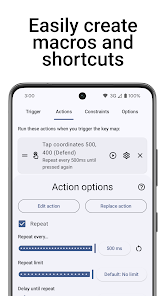
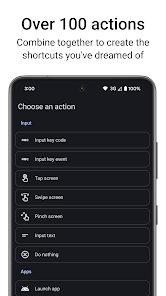
With Key Mapper, users can combine multiple actions into one macro. The system supports touch screen gestures, swiping, keyboard input, app launching, media control, and sending Android Intents. Actions can be arranged in sequence, set time delays, and support repeating tasks that need to be performed multiple times.
This is especially useful when you frequently perform the same series of actions. Instead of tapping each step individually, you can assign the entire sequence to a single key or key combination. Advanced users can also integrate Key Mapper with other automation tools via the Intent API.
Floating Buttons and Advanced Control Modes
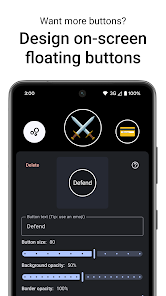
If your device doesn't have enough physical keys, Key Mapper allows you to create virtual button layouts on the screen to use like real keys. These floating buttons can be placed on different applications to perform quick actions without needing to open the main interface of the app.
Key Mapper uses Accessibility Service features to detect which application is currently active and apply shortcuts according to pre-configured conditions. According to information from Google Play, this service can record keyboard actions and simulate swipe or pinch gestures when users enable the corresponding feature; the developer also confirms that user data is not collected or sent online.
How to Use and Tips for Key Mapper
To get started with Key Mapper, you need to create a new key map and select the input device to configure. Then, press the key that will act as the trigger, and choose the corresponding action. For simple actions, you can start by turning volume buttons into shortcuts to open apps or control media.
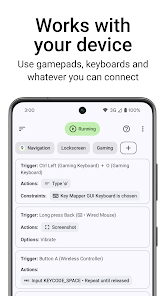
If you want to create macros, add multiple actions in the correct sequence and set time intervals between them if necessary. You should also use the condition feature to limit key maps to work only within a specific application. This approach helps prevent unintended actions when using other apps.
Conclusion
Key Mapper is a tool that helps users gain detailed control over how buttons and input devices function on Android. From changing the function of volume buttons, keyboard keys, or gamepads to creating macros, floating keys, and conditional shortcuts, the app offers many options to personalize your phone experience.
If you only need a simple shortcut, you can start with a basic key map. Once you're proficient in setting up triggers, actions, and constraints, Key Mapper can be used to build complex action chains for work, entertainment, or device control.