Button Mapper: Remap your keys MOD APK 4.10 (Premium)
⬇ Download APK (11 MB)| Version | 4.10 |
|---|---|
| Size | 11 MB |
| Updated | Oct 1, 2026 |
| Category | Personalization |
| Requires | Android 7.0 |
| MOD info | Premium |
| Google Play | flar2.homebutton |
MOD features
- Premium
Button Mapper is a tool that helps Android users customize the behavior of hardware keys on devices such as phones, tablets, Android TVs, or other peripherals. Instead of sticking to default button functions, you can configure single taps, double taps, or long presses to perform various actions like opening apps, turning on the flashlight, taking screenshots, controlling music, and much more.
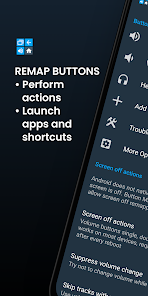
Customize keys to match your usage habits
The impressive part of Button Mapper is its ability to reassign functions to various types of hardware keys. The app supports volume keys, Home, Back, Recent Apps on compatible devices, as well as camera buttons, certain headphone keys, gamepads, and remote controls. Actual options will depend on the hardware of each device.
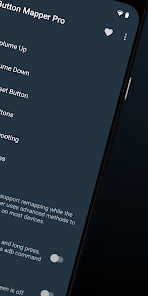
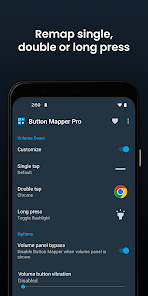
Each key can be configured with multiple different actions such as single press, double press, or long press. For example, you can use a volume key long-press to turn on the flashlight, a double-tap to open your favorite app, or assign a notification-display function. This is an effective way to shorten repetitive actions without opening apps the traditional way.
Assign multiple actions to a physical key
Button Mapper provides a wide range of diverse tasks, from opening apps or shortcuts, toggling the flashlight, taking photos, turning off the screen, taking screenshots, controlling music playback, adjusting volume and brightness, switching to the previous app, enabling Do Not Disturb mode, opening Quick Settings, Bluetooth, Wi-Fi, or screen rotation. Some advanced features require root permission, ADB, or the Pro version.
Device support and advanced options
The app does not require root for basic operations, though certain functions can only be executed via ADB commands from a computer if the device is not rooted. Button Mapper also supports Shizuku and includes additional Pro options such as simulating keycodes, changing haptic feedback, swapping Back and Recent Apps functions, running scripts, or broadcasting intents.
Usage tips and guide for Button Mapper
After Button Mapper is installed, you need to grant the Accessibility Service permission as guided within the app to ensure smooth key recognition. Next, select the key you want to customize and configure the appropriate action for triggers such as single press, double tap, or long press. It is recommended to start with basic functions like turning on the flashlight, opening the camera, or skipping tracks before trying advanced features.
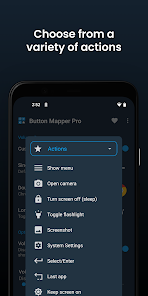
For commands requiring ADB or root access, read the in-app instructions carefully before proceeding. However, the app does not support changing the behavior of on-screen navigation keys or the power button through standard methods. Some devices may be affected by battery management modes, so you need to check background running permissions if the feature stops working automatically.
Conclusion
Button Mapper is a useful tool for Android users who want to turn their physical buttons into versatile shortcuts. The app supports many functions such as launching apps, controlling music, toggling the flashlight, taking screenshots, or executing complex commands. Users can start with features that do not require root, while advanced users can utilize ADB, Shizuku, or root privileges to maximize customization capabilities.