
| الإصدار | 1.6.5 |
|---|---|
| الحجم | 164 MB |
| تاريخ التحديث | 1 أكتوبر 2026 |
| التصنيف | أدوات |
| يتطلب | Android 8.0 |
| معلومات MOD | Premium |
| Google Play | com.cosmomime.cosmoscreenimagetranslate |
ميزات MOD
- Premium.
Screen & Manga Translator is a translation application for Android, primarily designed for users reading manga, webtoons, playing games, or using apps in foreign languages. Developed by COSMOMIME, it integrates text recognition technology, direct on-screen translation, batch image processing, and a built-in translation browser, helping users save time without needing to take screenshots and translate separately.
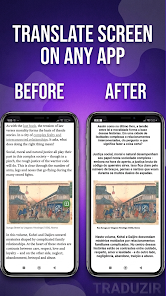
Perform instant screen translation while reading comics or playing games
Screen & Manga Translator features a floating overlay layer, allowing you to access translations while continuing to use other apps. Users can capture the entire screen and translate quickly with a single tap. The Auto-Translate function automatically detects screen changes, perfect for dialogue-heavy games or auto-scrolling webtoons. The app also provides a Quick Settings Tile to launch the translation service from Android's quick settings interface.
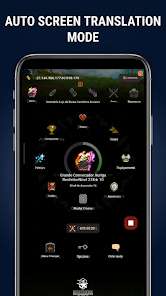
This method is especially useful when content doesn't support your language. Instead of taking a screenshot, opening a translator, uploading the image, and switching back to the app, you can translate directly on the content you're viewing without leaving the main application.
Optimized text recognition for comics and webtoons
Screen & Manga Translator is specially designed for the complex layouts commonly found in comics. The app features multiple text processing modes for black-and-white manga, screentone, and full-color digital comics with vibrant colors. The OpenCV Inpainting tool is used to remove original text and restore the background before displaying the translation.
Display translations with Shrink, Expand, and Strict modes to adjust text within speech bubbles. The app supports both horizontal and vertical layouts, including manga read from right to left and vertically scrolling webtoons. This allows translations to align closely with the original comic page structure rather than simply displaying as separate paragraphs.
Batch image processing and series export
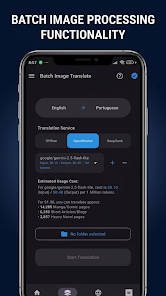
Beyond direct screen translation, Screen & Manga Translator also supports processing multiple images at once or entire directories. Series Mode helps organize comics by folder, track progress, and process manga batches. Once complete, content can be exported to PDF, CBZ, or ZIP formats for use with e-readers.
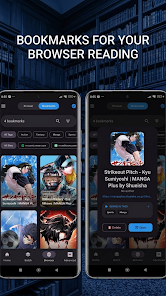
The app also integrates a translation browser. Users can access manga or light novel sites within the app, save favorite sources using Smart Bookmarks, and translate web content without constantly switching between the browser and translation tool. For inaccurate translations, users can manually edit to adjust text recognition and translation content before use.
Tips and guide for Screen & Manga Translator
Getting started with Screen & Manga Translator, begin by testing the quick translation feature on a simple image or screen to study how content is recognized. When translating comics, selecting the preprocessing mode suited to each image type will optimize the recognition and original text removal process. Black-and-white manga and color webtoons have different backgrounds, so choosing the correct mode will improve translation quality.
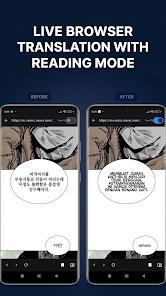
If you frequently use games or apps with constantly changing content, the Auto-Translate feature can save manual effort. However, for screens with many dynamic elements or effects, you should verify the translation results rather than fully relying on automatic translation. For longer comics, Series Mode and batch translation will be more convenient compared to processing each page individually.
Conclusion
Screen & Manga Translator focuses on the need for direct on-screen translation on Android platforms rather than simply functioning as a standard text translator. Features such as screen translation, Auto-Translate, comic layout recognition, speech bubble customization, batch processing, PDF/CBZ/ZIP export, and an integrated translation browser make the app suitable for comic readers, webtoon fans, language learners, and gamers who frequently encounter non-localized content. If you need to translate large quantities of comics, the series management tool and manual editing will make the process more flexible.







